
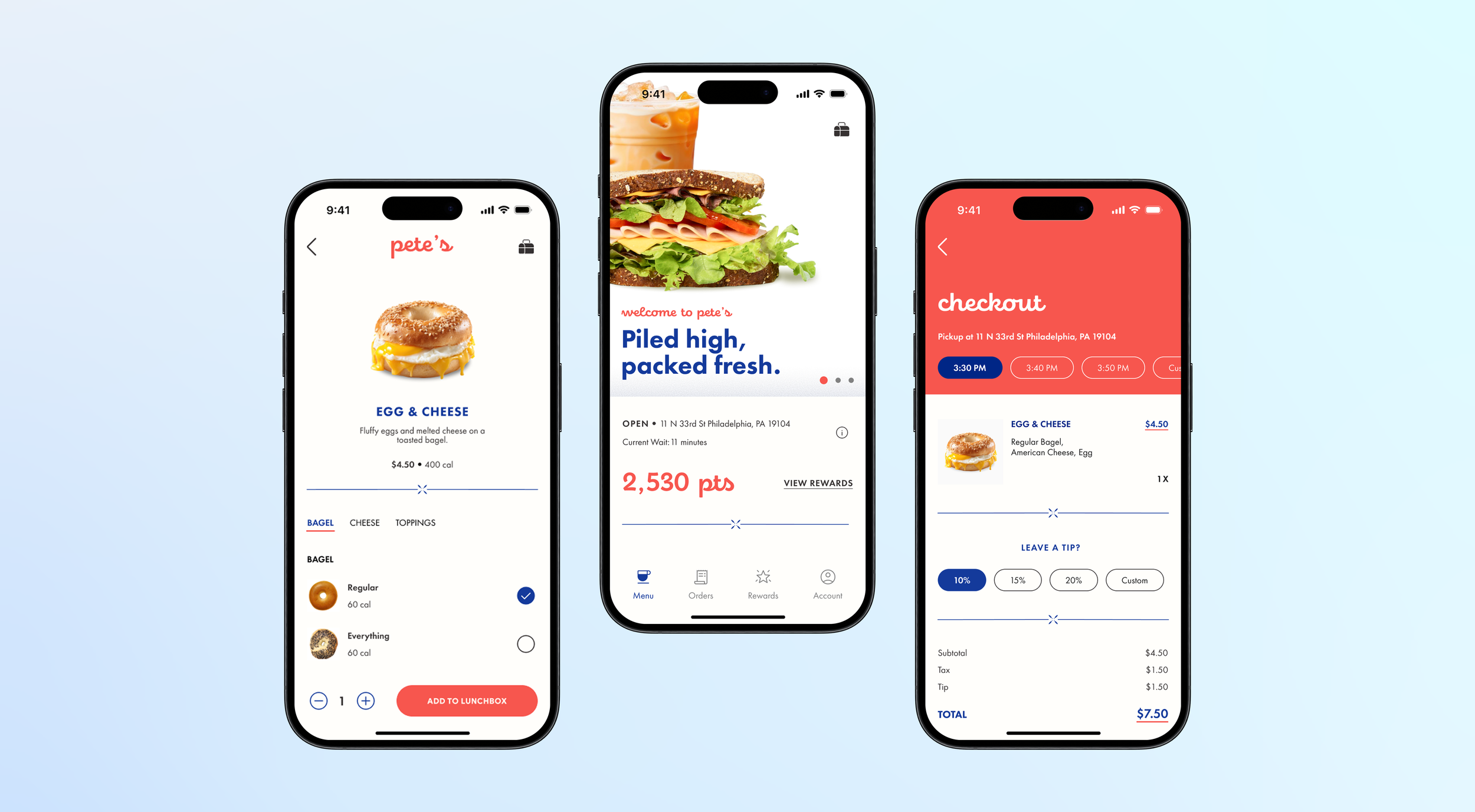
Designing a fast & friendly mobile ordering experience for a food truck that runs on regulars.
PETE’S LITTLE LUNCH BOX
AT A GLANCE
Pete's Little Lunch Box is a small, beloved food truck parked outside Bentley Hall on Drexel's campus, known for a convenient breakfast, its friendly employees, and a loyal community of regulars. My team set out to design a digital ordering experience that matched the fast-paced, student-centered culture of the truck - one that would reduce line buildup during peak rushes without losing the personal, familiar feel that keeps people coming back.
I led our research and kept the project organized from observation through final prototype, while also shaping the core UX flows and the visual layout of the app.
ROLE & TEAM
User Research, Project Organization, UX/Interaction Design, Layout & Visual Design alongside Shannon Jaya, Ashley Nguyen, and Maayan Chashper
SKILLS
Figma
Adobe Suite
Usability Testing
UX Research
TIMELINE
Sep 2025 - Dec 2025
IMPACT

✅
95%
completion rate amongst primary tasks in the app across 20+ user tests.

🤳
3/10 → 8–10/10
likelihood-to-use score, from paper prototype to final high-fidelity design.

🥡
100%
of users believed this app would make ordering from pete’s more convenient.
PROBLEM
A predictable rush was creating an unpredictable wait.
Like many campus food vendors, Pete’s Little Lunch Box operates on a predictable but time-sensitive rush pattern. Lines can form rapidly around noon as students pass between classes, and workers often need to place orders quickly while on their break. Because the menu is small and most customers are regulars, people tend to order immediately without browsing, but bottlenecks still form during the peak window. Customers typically wait between 1–6 minutes depending on the order, and many pass the time listening to music, scrolling on their phones, or paying through Venmo while they wait.
The main challenges included:
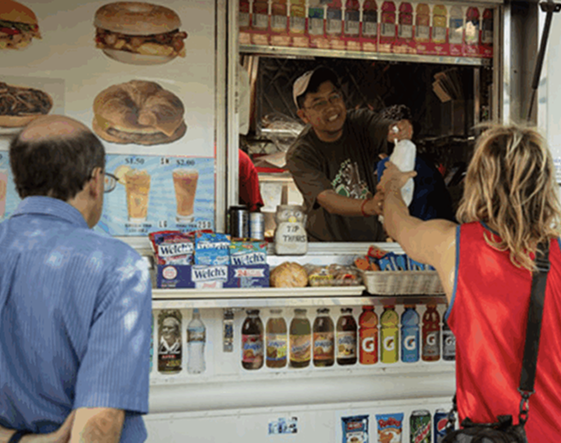
⏱️
Rush hour bottlenecks
Lines form fast around noon as students pass between classes and workers order on short breaks. Wait times run 1–6 minutes, but even that is enough to create a backup at a single window.
📱
Most orders already decided upon
Most customers aren't browsing — they arrive with their order memorized or already pulled up on their phone. A menu-first app would slow people down, not speed them up.
💳
In-person only payments
The truck runs almost entirely on a taped-up Venmo QR code and cash. Any digital solution had to enhance that familiar, low-friction system instead of replacing it with something more complicated.
This led us to design based off of a guiding question:

"How might we help customers order and pick up their food quickly and predictably, without losing the personal, community feel that makes Pete's, Pete's?"
INITIAL RESEARCH
The opportunity wasn't adding features - it was matching the pace people already move at.
The challenge for our team was to design an ordering experience that minimized wait times, reduced congestion at the truck, and gave customers more flexibility in how and when they pick up their food, without disrupting the friendly, casual culture the truck is known for. Additionally, because the current business relies heavily on in-person interactions and simple payment methods, we needed to introduce digital features that enhanced, rather than complicated, the existing workflow. This meant balancing convenience with familiarity.
Fly-on-the-Wall Observation Study
To understand Pete's before designing, I conducted an individual fly-on-the-wall observation during the lunch rush, tracking how customers approached the truck, decided what to order, waited, paid, and left. My team then combined our individual observations into a single set of findings:
☕️ Most customers were regulars who ordered without checking the menu
📱 Payment was overwhelmingly digital (Venmo, with some cash)
🎧 The wait itself was filled with phone-scrolling, music, and small talk
Project & Business Model Canvas
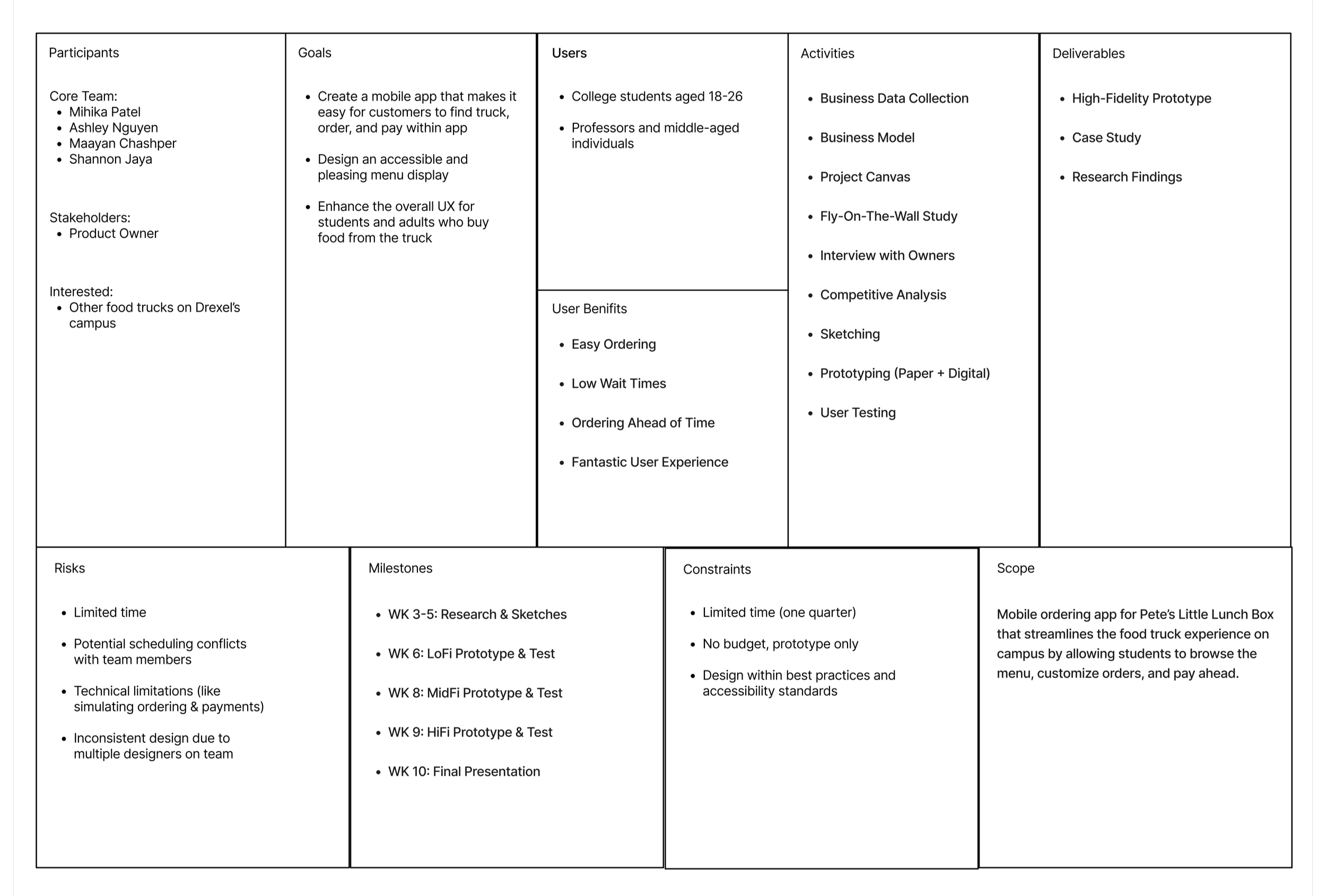
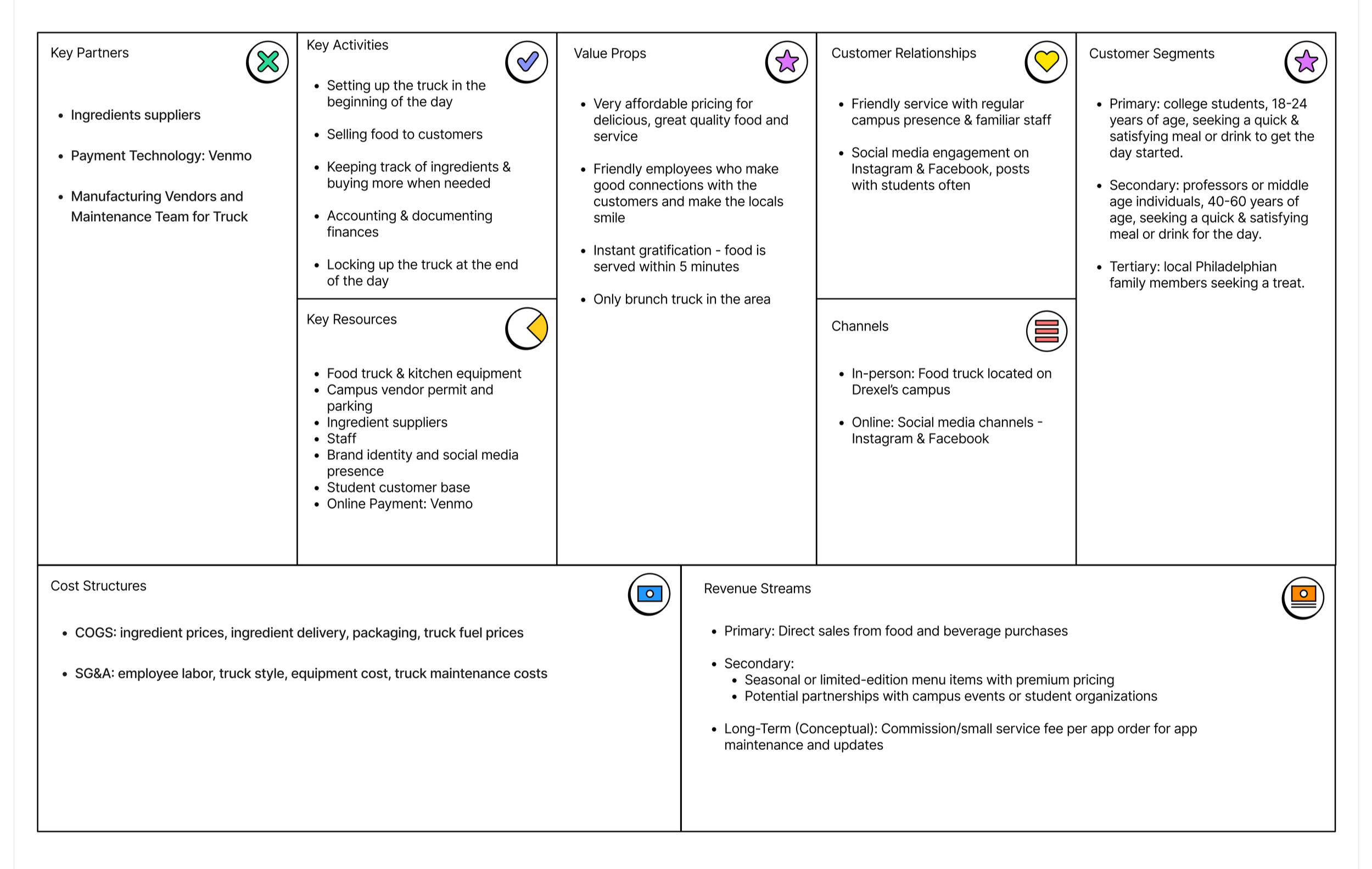
From there, I helped build out our Project Canvas and Business Model Canvas in FigJam - mapping the team's goals, target users, risks, and milestones alongside Pete's key partners, resources, value props, and revenue streams. This gave us a shared foundation before any research synthesis began: our primary users were college students 18–24 looking for a quick, satisfying meal, with professors and local workers as secondary and tertiary segments.
Project Canvas:
Business Model Canvas:
UX RESEARCH
Every method of research pointed to the same truth: speed and familiarity were the product, and our job was to protect both.
Customer Interviews
I wrote and ran a customer interview script and personally interviewed 6 Pete's customers - students, a professor, and regulars - covering their ordering habits, technology use, and pain points. Patterns emerged quickly: people came to Pete's for speed and personal touches (an employee offering to pour a drink into a customer's own bottle stuck with more than one interviewee), and the most-requested improvement across the board was more payment flexibility, especially Apple Pay.

"I like that Pete’s is convenient and quick, rather than cooking or a sit-down." ✅
Ava, Student
"I wish there were other forms of payment." ❌
Helen, Student
"The staff is very friendly." ✅
Christine, Professor
Competitive Analysis
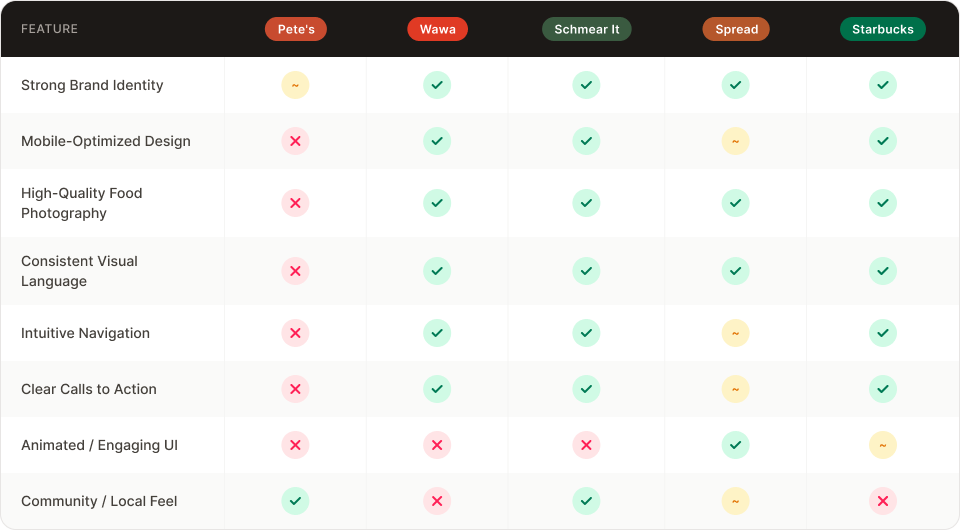
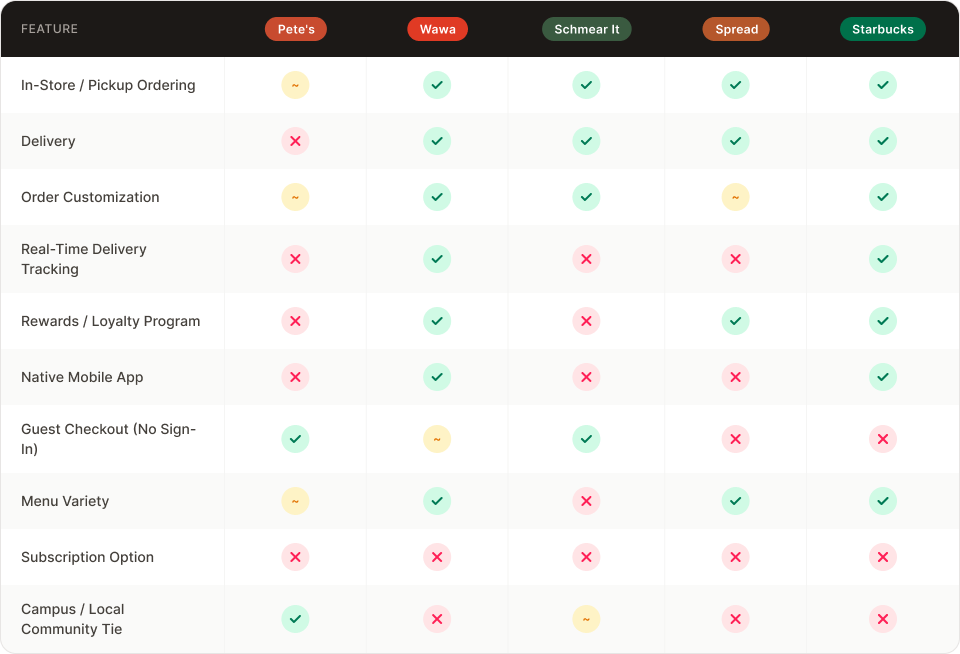
My team and I researched four competitors - Wawa, Starbucks, Schmear It, and Spread - auditing their offerings, strengths, weaknesses, and online ordering flows screen by screen. This surfaced feature gaps worth stealing (visible loyalty progress, guest checkout, transparent per-item pricing) and pitfalls to avoid (Starbucks' cluttered featured-item menu, Schmear It's confusing branded terminology).
Visual Audit (Aesthetic):
Functional Audit (Interaction):
Prioritization
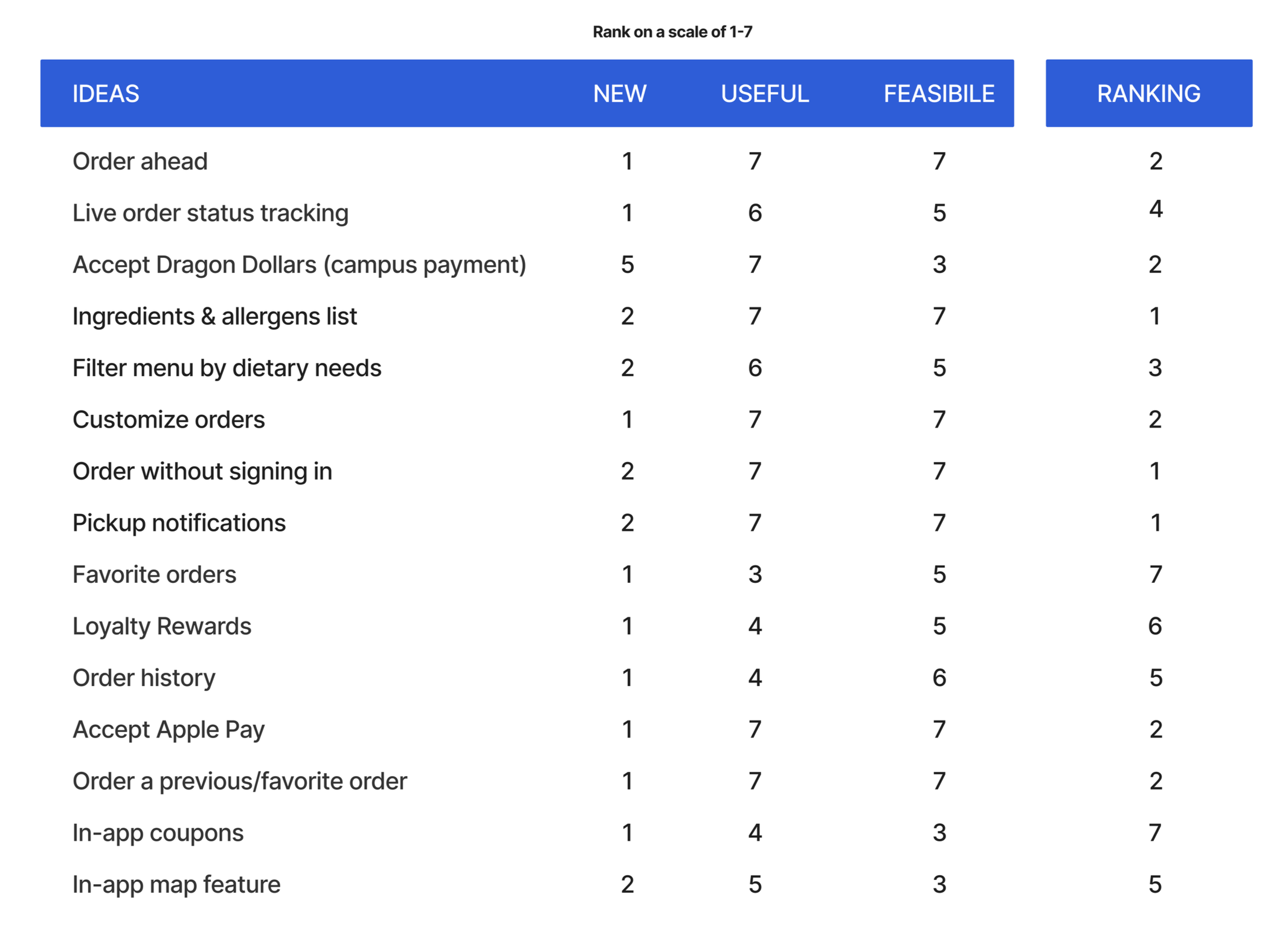
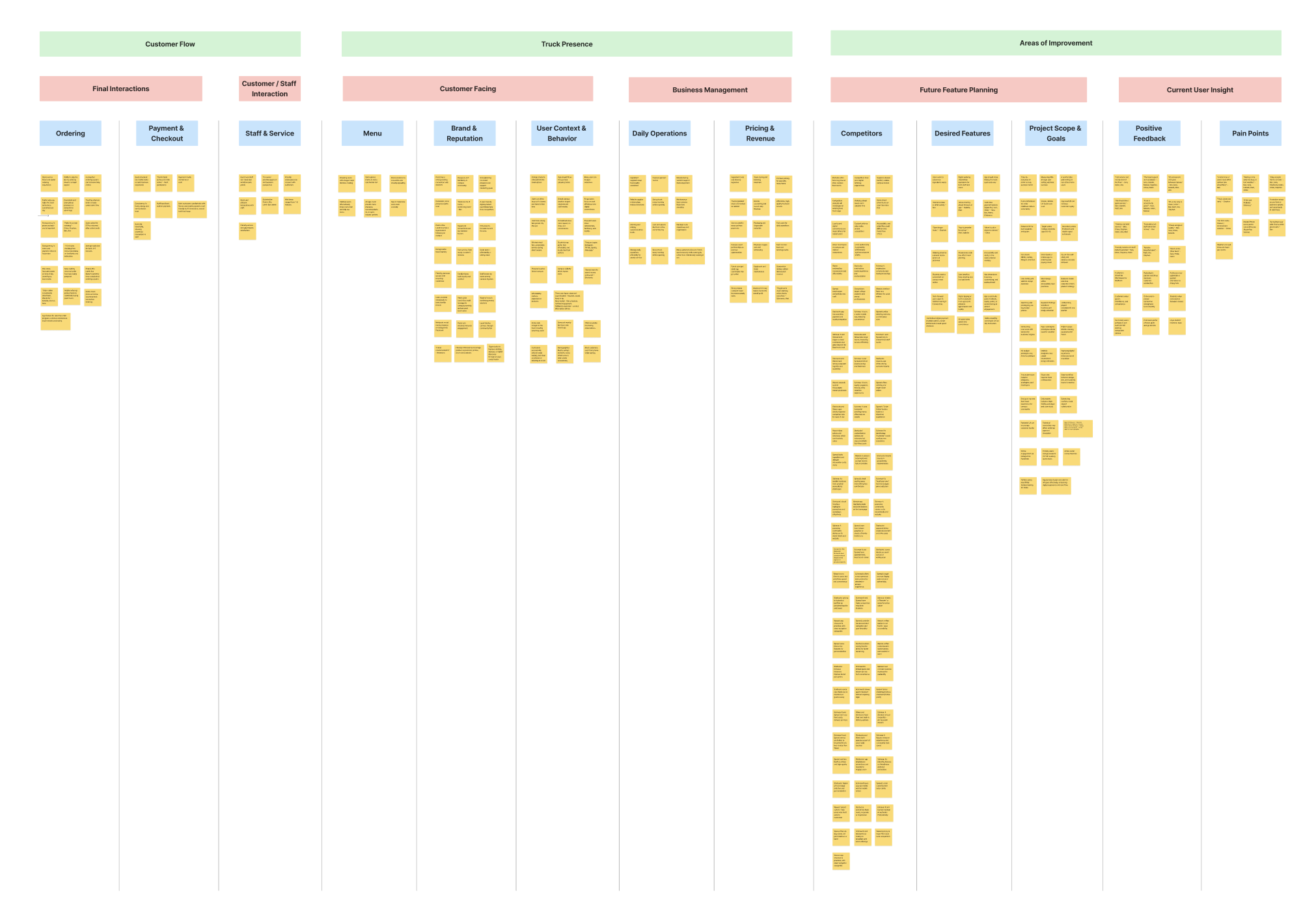
Using an affinity map and a NUF (New/Useful/Feasible) chart, we scored roughly 15 feature ideas - from order-ahead and pickup notifications to loyalty rewards and Dragon Dollars support - to decide what made the cut for our first prototype. Pickup notifications, accepting other forms of payment, and order functionalities ranked as our top priorities.
Personas & Journey Maps
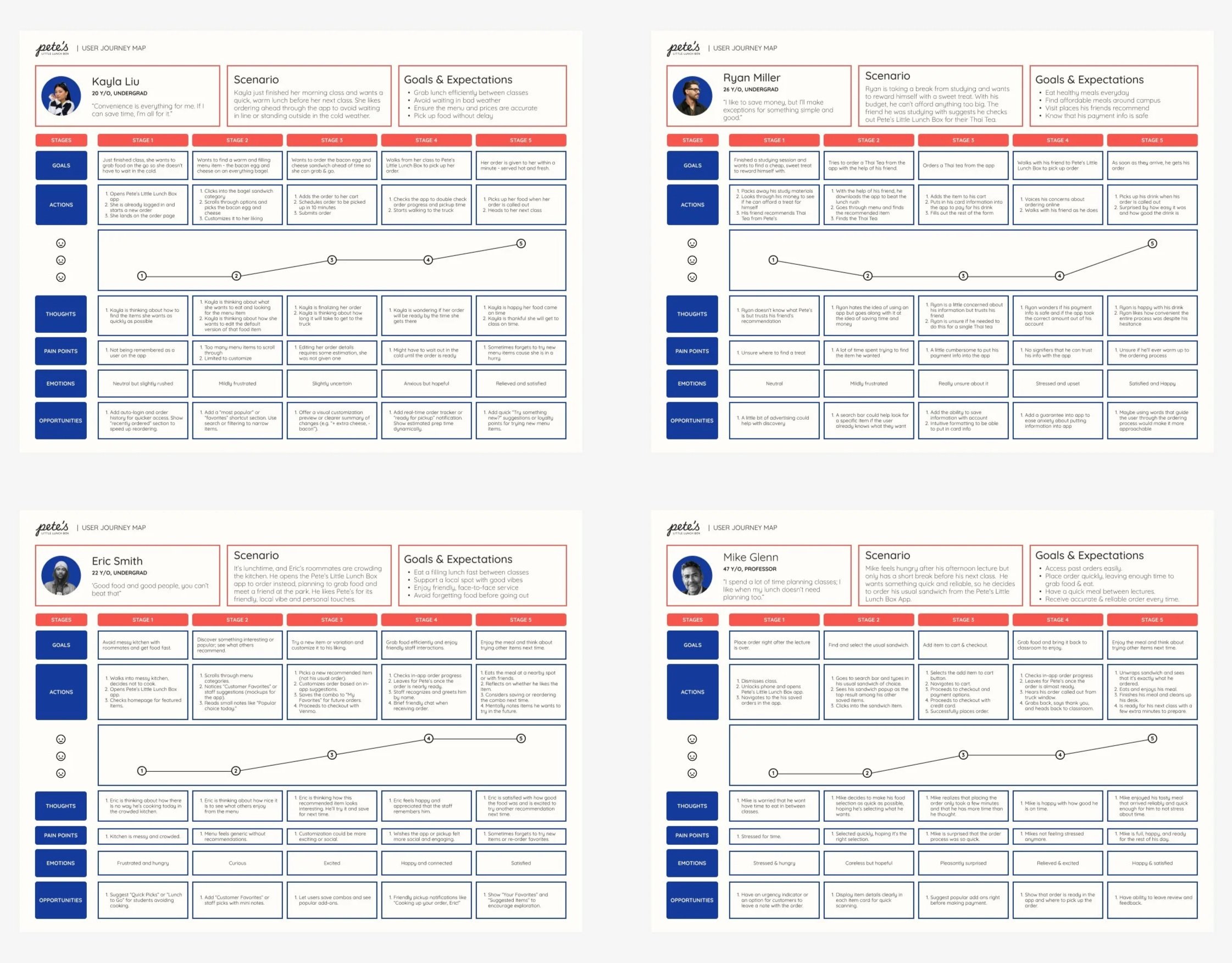
From the interviews and observation data, I helped define four personas. A Convenient User (Kayla, a busy undergrad who orders ahead to avoid waiting), a Social User (Eric, who treats food as part of his social routine), a Budget User (Ryan, thoughtful about spending but willing to splurge on something simple), and a Routine User (Mike, a professor who wants lunch to require zero planning).
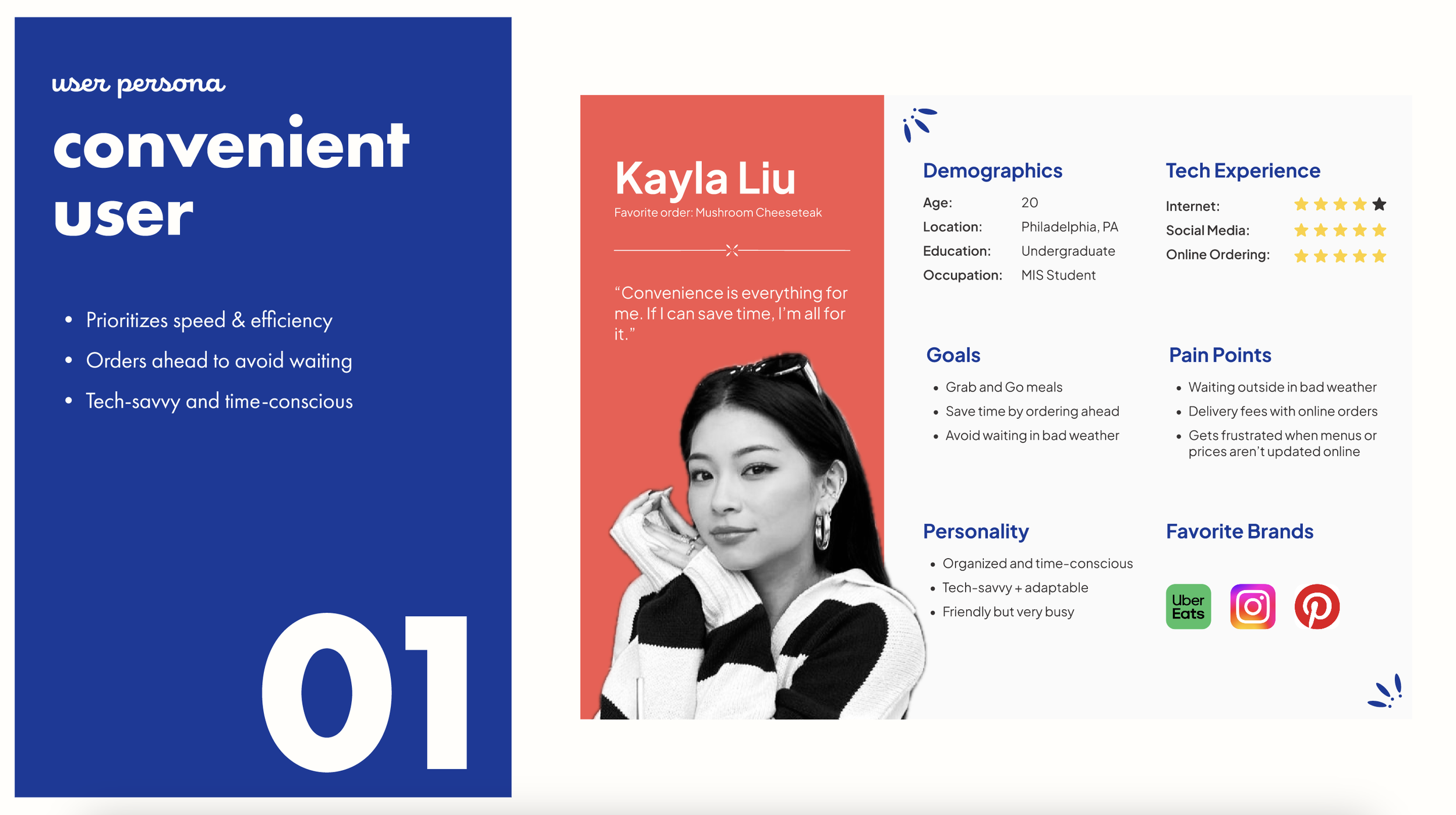
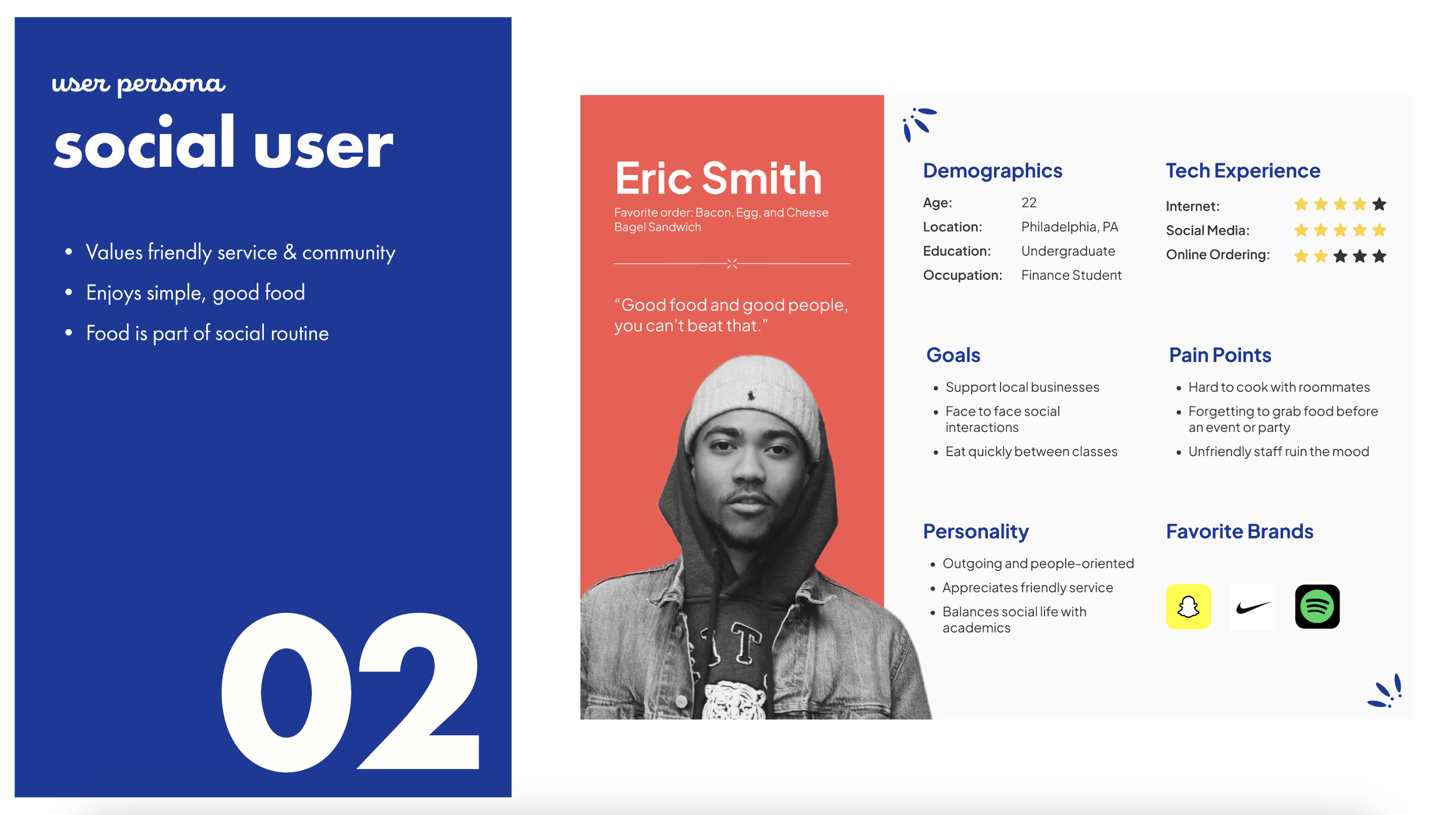
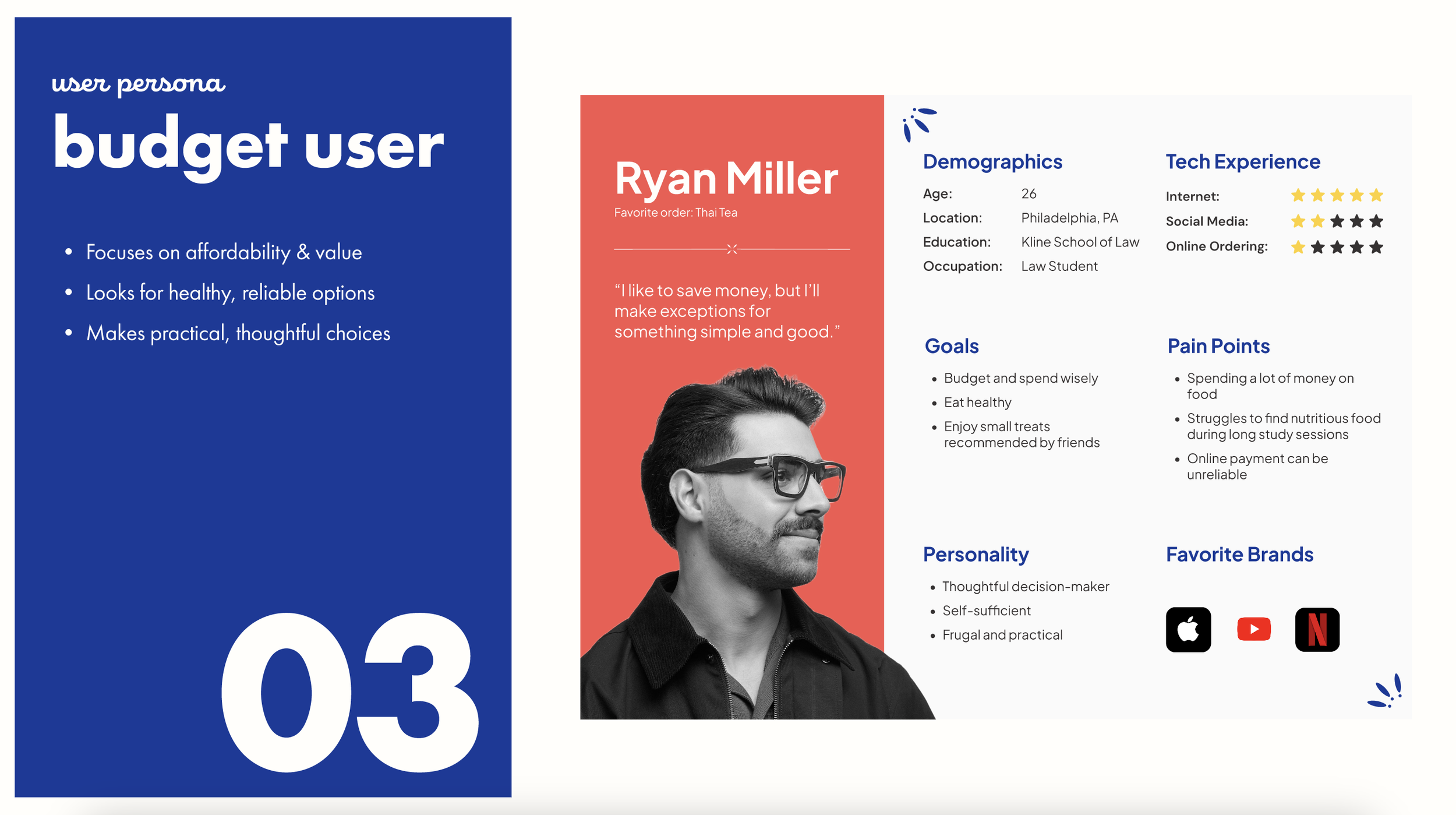
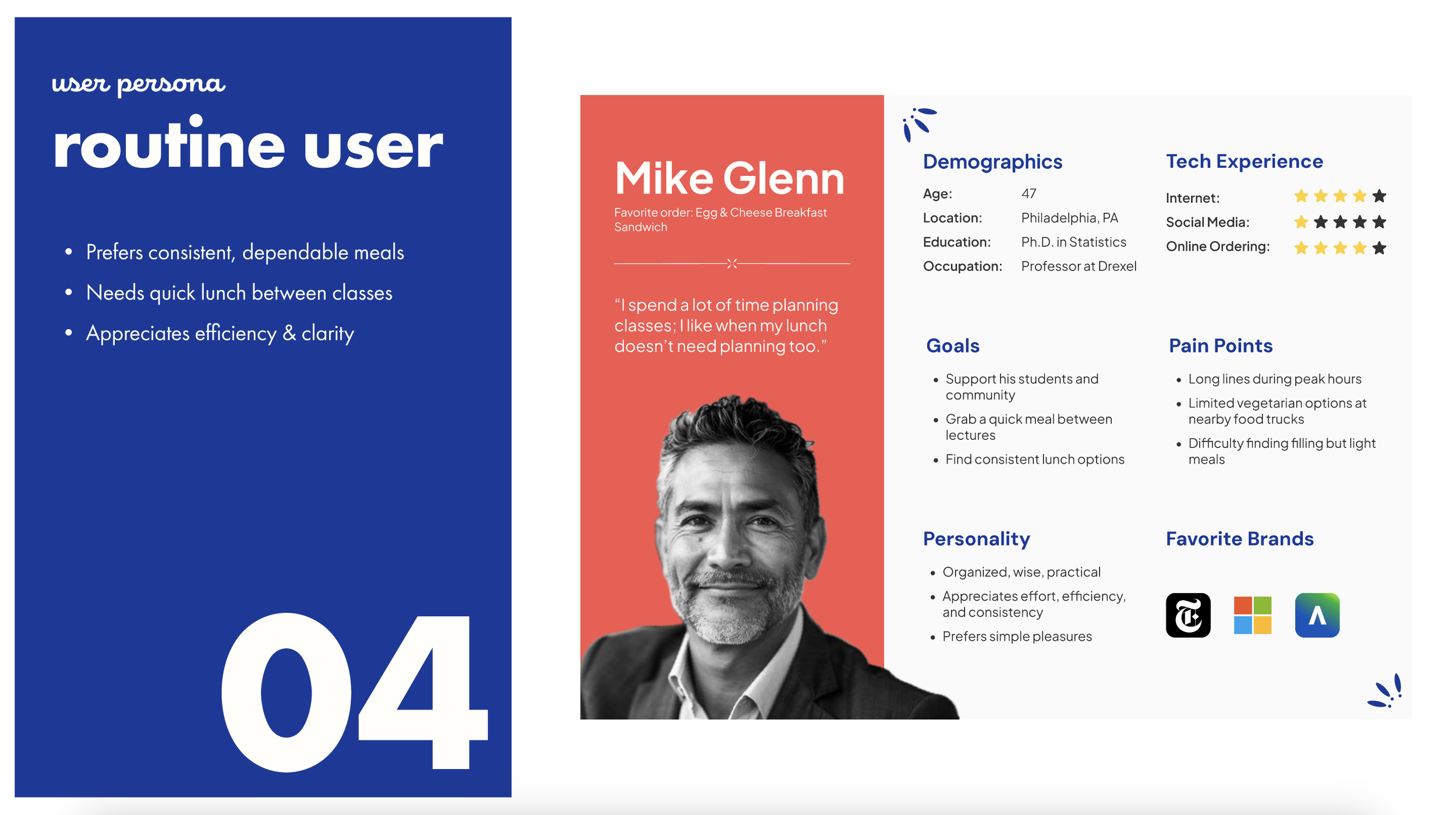
I then mapped each persona's end-to-end journey - goals, actions, thoughts, pain points, emotions, and opportunities - which directly shaped our early task flows, especially around reducing decision fatigue and building trust in digital payment.
DESIGN PROCESS & USABILITY TESTING
Branding Direction
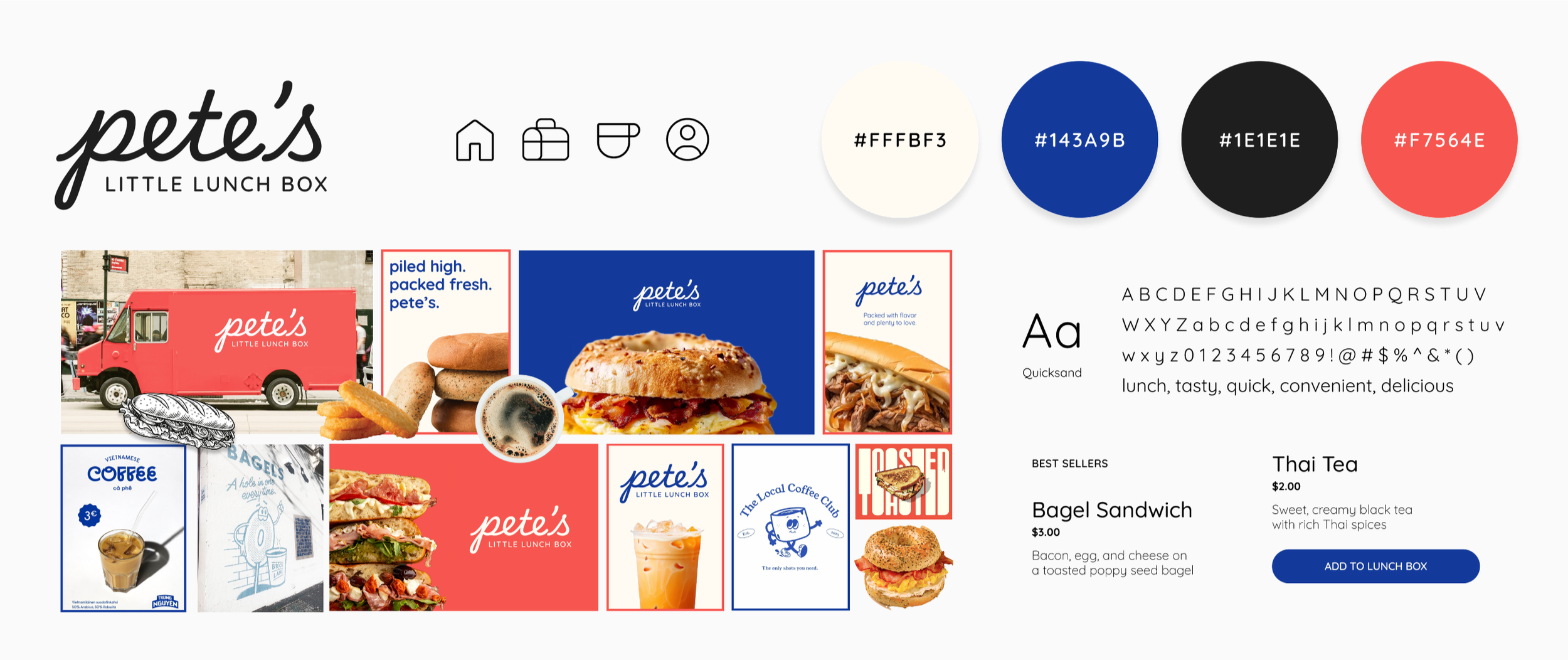
Before sketching screens, I contributed to an initial moodboard exploring Pete's visual identity - a warm, vintage Americana palette (navy, cream, coral-red), Quicksand as a friendly rounded typeface, and hand-drawn touches that echoed the truck's real signage.
Paper Prototype
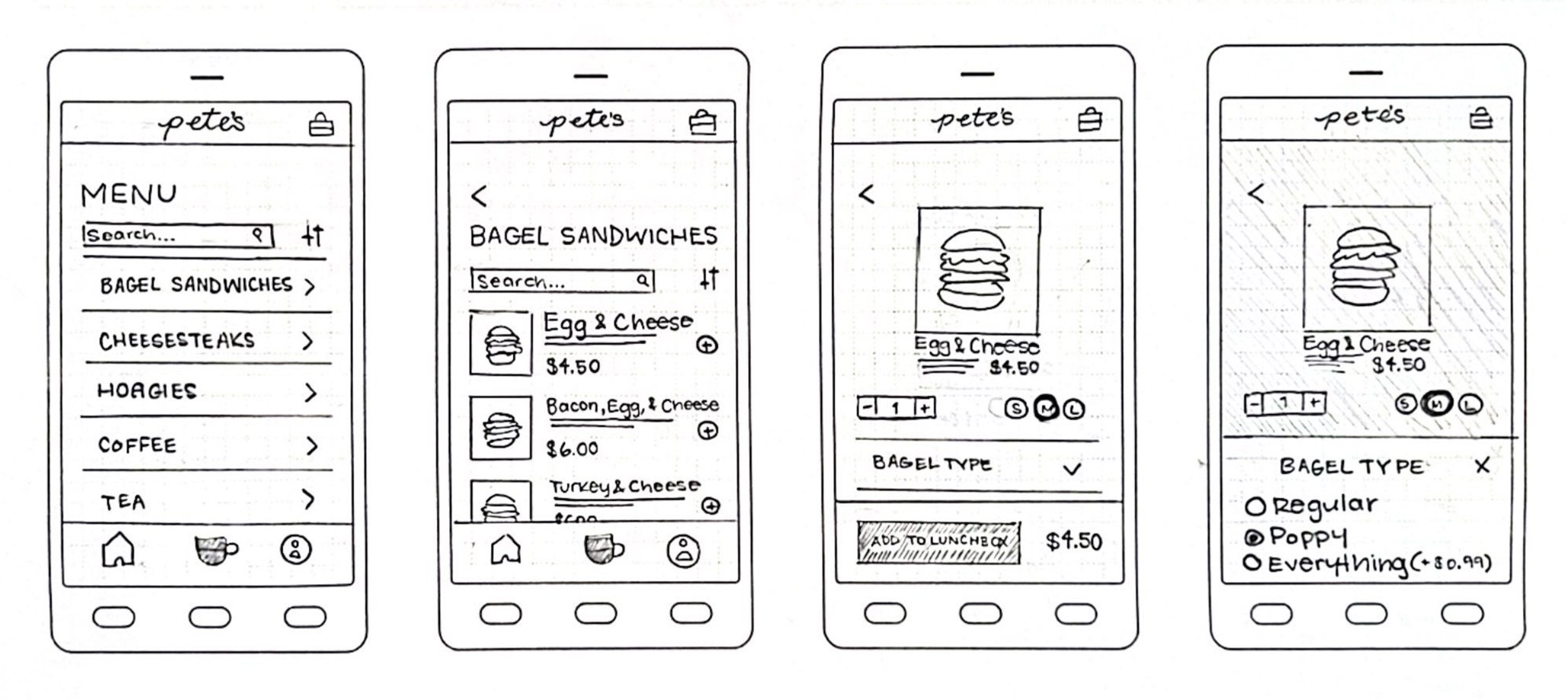
I ran an in-person usability test with a paper prototype, asking a participant to sign up, browse, order, and check out. The result was a 3/10 likelihood-to-use score - she found the flow too long, was confused by an early payment-info request, and wanted Apple Pay and guest checkout.
Low Fidelity Prototype
After iterating on the flow, I ran two more rounds of remote testing. The first (7/10) surfaced confusion around scheduling orders ahead and a search bar that only searched within one menu category. The second round, after reworking the homepage and information architecture, jumped to 10/10 and 8.5/10 - testers specifically called out the rewards page and the "lunch box" cart icon as standout moments, while flagging a bland account page and a missing central homepage.
Mid Fidelity Prototype
With color and clearer visual hierarchy introduced, scores were 6/10 and 10/10. The lower score came from a tester who wanted customer ratings on menu items and dark mode - a clear signal that first-time users needed more confidence cues before ordering something unfamiliar.
High Fidelity Prototype
Final rounds of testing scored 8/10 and 8-9/10. Remaining requests centered on a global search bar, saved/one-tap reordering, and clearer discoverability of truck location and hours.
FINAL TOUCHES
Testing insight directly drove several key changes to the final design.
💳 Added Apple Pay alongside Venmo and cash, addressing the single most-repeated request across every round of testing.
🎯 Built a true homepage that centralizes truck info, the menu, and rewards - fixing the "where do I even start" confusion that showed up from paper prototype through mid-fidelity.
🌟 Made the rewards section a permanent, prominent fixture rather than a secondary screen, since it consistently stood out to testers as the feature that felt most "Pete's."
🍴 Added persistent filter states and active-filter indicators, so users could tell at a glance which dietary filters were applied.
💰 Introduced pricing transparency for add-ons and toppings during customization, so nothing was a surprise at checkout.
📍 Clarified the truck-location icon with a label and made the address tappable to open directly in Maps.
🧾 Added a live order-status banner on the homepage showing pickup time and prep progress.
RESULTS
From a 3/10 first draft to a design people were consistently ready to use.
By the final round of high-fidelity testing, likelihood-to-use scores had climbed from a 3/10 on our very first paper prototype to a consistent 8-10/10 - a direct result of nearly 20 cumulative usability tests across four fidelity stages. The final prototype supported realistic end-to-end task flows: signing up, browsing and filtering a menu, customizing a food item, checking out with flexible payment, scheduling pickup, and tracking loyalty points - all while preserving the fast, friendly, community-driven feel that makes people choose Pete's over a chain competitor in the first place.
Here's a video of our high-fidelity prototype with the final touches!
TAKEAWAYS
Implementing user-suggested features translates personality to the product.
This project reinforced how much a small, community-run business's "personality" needs to survive translation into a digital product. I learned that the features that tested best weren't the flashy ones, but rather the ones that mirrored real in-person moments, like the rewards page or the lunchbox cart icon. Running the same core task flow through paper, low, mid, and high-fidelity testing also showed me how much clarity compounds: fixing "where's the menu" early made every later round of feedback more specific and useful.
If we kept iterating, the next priorities would be customer ratings and reviews on menu items (repeatedly requested by first-time users deciding what to order), dark mode, one-tap reordering of favorites, and a more built-out "About Us" section that carries the truck's community-first branding even further into the app.