
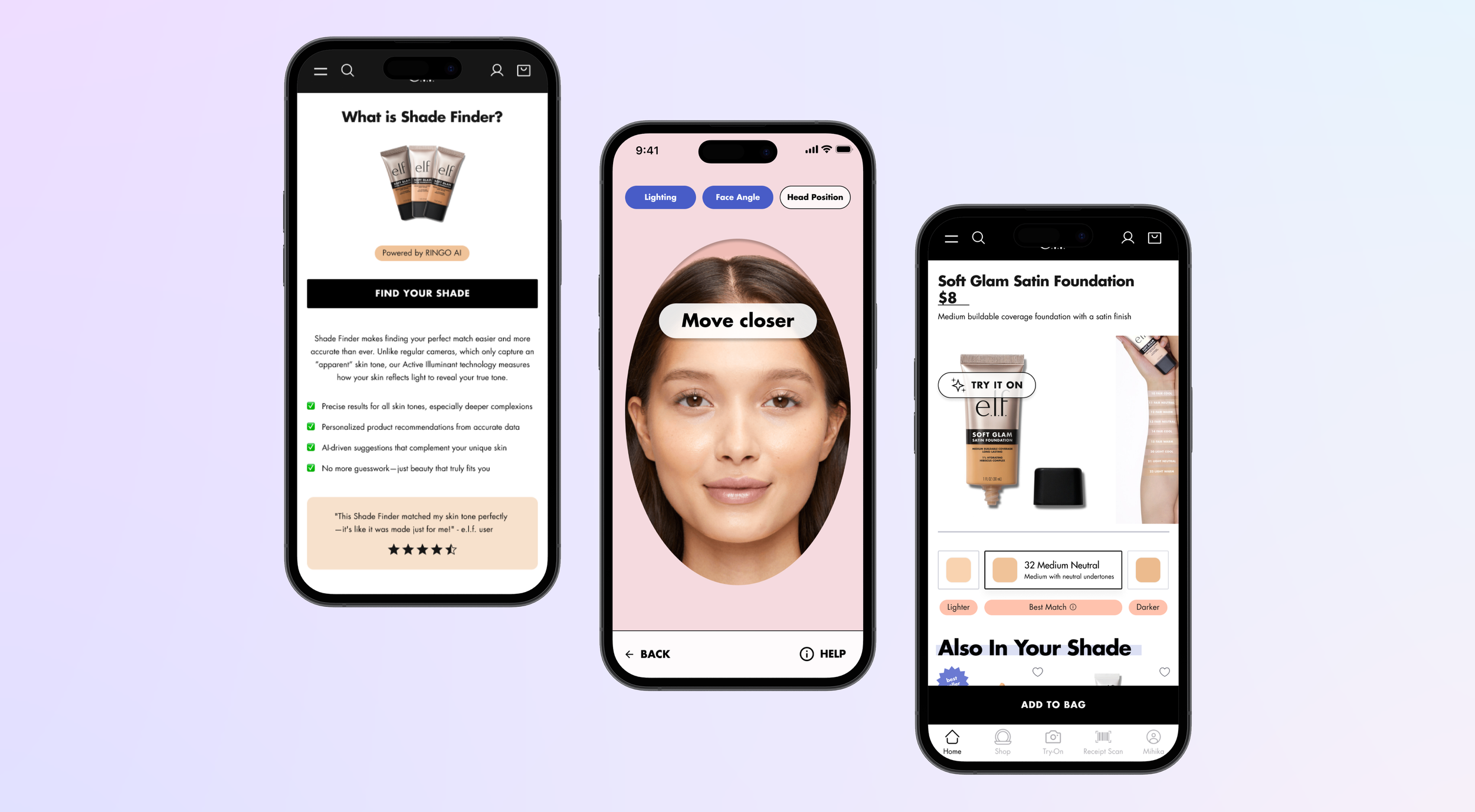
Turning scattered project history into guidance that Project Managers can actually use.
EXELON LESSONS LEARNED CHATBOT
AT A GLANCE
During my co-op at Exelon, I redesigned the UX and UI of an internal AI chatbot that helps Project Managers (PMs) surface lessons learned from past construction and gas projects. The original chatbot had been built by developers with no UX consideration and no alignment to Exelon's branding. I took the redesign on myself, owning the work end to end: stakeholder interviews, competitive analysis, ideation with AI tooling, high-fidelity design, and usability testing with real PMs.
ROLE & TEAM
Lead UX/UI Designer & UX Researcher, alongside the Data Engineering team at Exelon
SKILLS
Figma
Competitive Research
UX Strategy
Interface Design
TIMELINE
Jun 2026 - Sep 2026
IMPACT

📈
100%
of PMs completed every task without getting stuck
✅
9/10
average likelihood of using the chatbot if it were available today
🎯
100%
ease-of-use rating from both testers
PROBLEM
Valuable lessons existed, but PMs couldn’t find them.
Exelon's construction and gas projects require intense planning to keep budgets on track. When unaccounted-for factors appear mid-project, they trigger new budget requests called change orders, which need approval to move forward. Change orders like these cost the company tens of millions of dollars every year, and many could be avoided if PMs knew what to watch for during planning.
Exelon tracks its projects in Unifier (uPPM), which acts as a one-stop shop for requests, business processes, and project management. One required process is "lessons learned," where PMs document what they learned from a project: risks they hadn't accounted for, unforeseen circumstances, and any change orders that resulted. In theory, this gives future PMs a baseline for projects in the same location or with the same materials.
In practice, the process broke down at retrieval:
PMs had to search lessons learned manually, using keywords they guessed would be relevant (locations, materials, scopes)
There was no way to confirm they had reviewed everything relevant
Unifier couldn't recommend lessons learned based on a project's context
The result was a large body of useful data that was difficult to scan, absorb, or act on, and too many avoidable change orders.
A lessons learned chatbot was built to close that gap. But the first version had no branding, no intuitive flow, and no UX thinking behind it. Recognizing that, I decided to redesign it.
This led us to design based off of a guiding question:
“How might we help PMs quickly and confidently find the lessons learned that matter for their project, before those lessons turn into change orders?”
INITIAL RESEARCH
Stakeholder Interview
I started with my manager to understand the chatbot's goals, KPIs, and current issues, as well as the lessons-learned process itself: who uses it, when they reference it, and how it gets considered during planning. This gave me a baseline for balancing business goals with an experience that would feel easy and helpful for internal PMs.
1
Prevent problems, not just find information
The chatbot needed to surface relevant risks early enough to influence project planning and reduce avoidable change orders.
2
Turn historical data into actionable guidance
Lessons learned already held valuable knowledge, but manual keyword searching made it hard to discover comprehensively.
3
Design for trust and adoption
PMs needed accurate, contextual responses and a more flexible conversational experience before the chatbot could become part of their day-to-day workflow.
Framing the Problem
After the interview, I used FigJam to lay out context, users, problems, goals, and KPIs alongside my interview findings. This gave me a mindset to design from and kept my ideas grounded in both business and user needs.
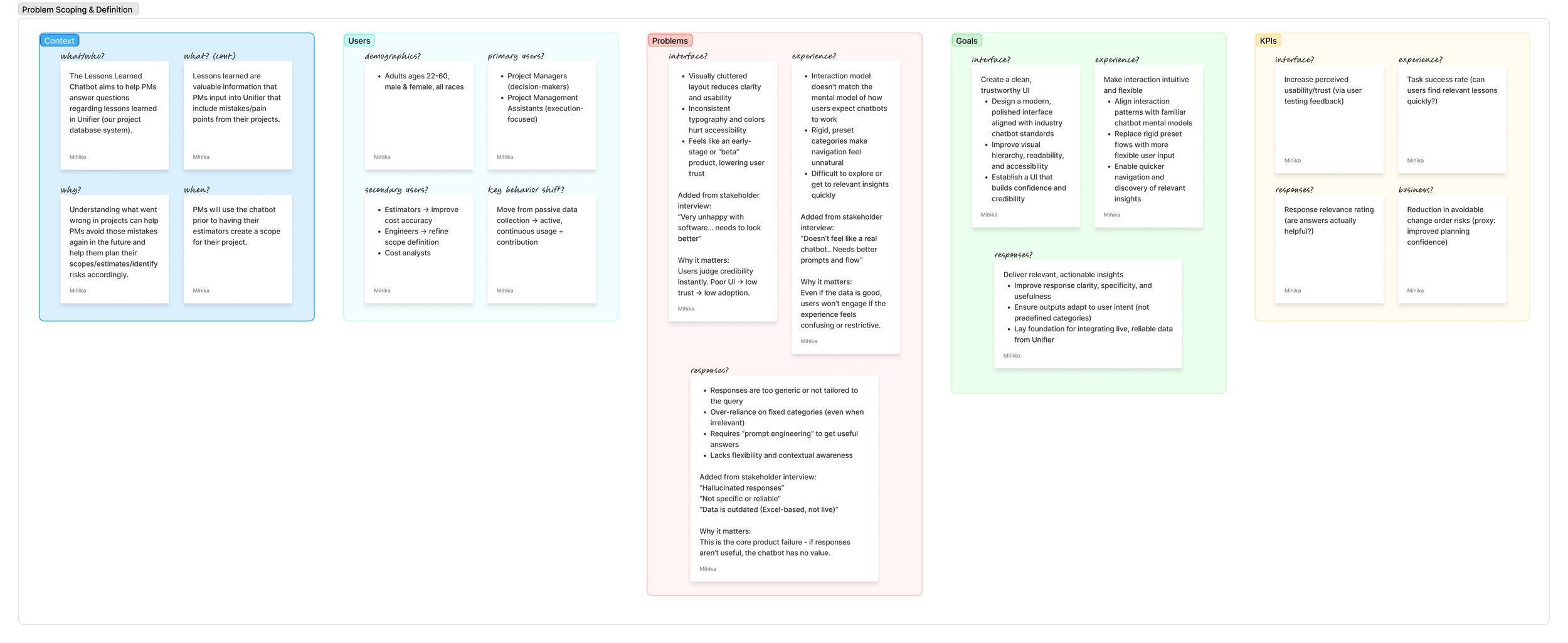
From there, I wrote a problem statement:
“Project Managers experience difficulty accessing relevant lessons learned insights when using the chatbot due to a cluttered interface, inflexible interaction flow, and limited response relevance. This is a problem because it creates friction in the discovery process, reduces user confidence, and may hinder adoption of the product.”
UX RESEARCH
Competitive Analysis
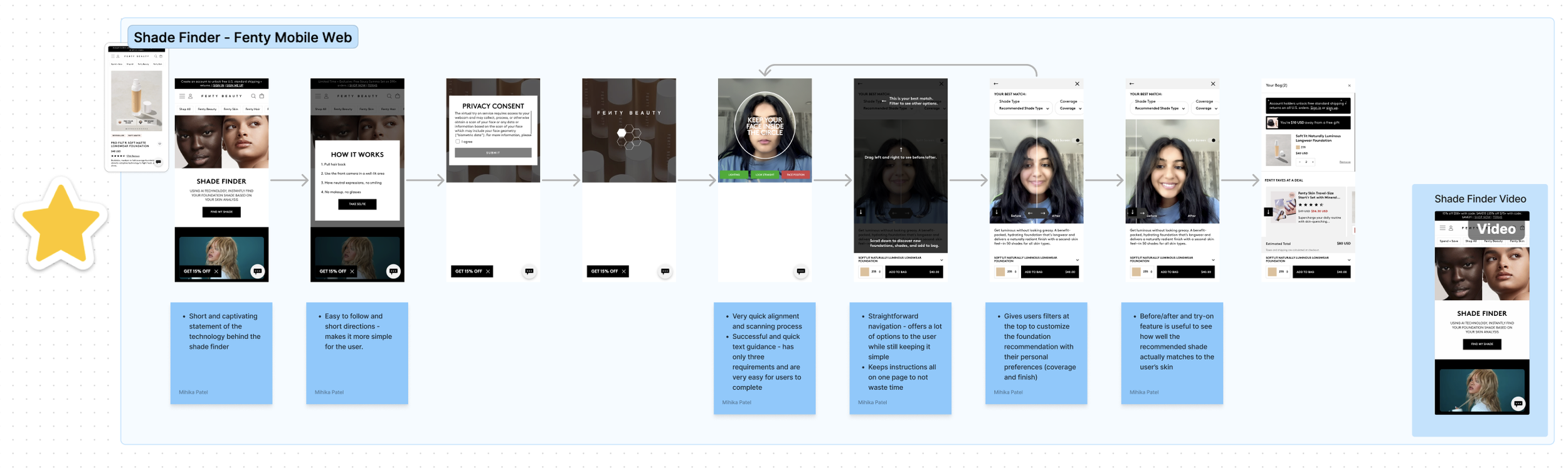
Because the chatbot is an internal tool, there were no comparable internal products to benchmark against. Instead, I turned to the leading AI chatbots: Copilot, ChatGPT, Claude, and Gemini. I captured the same screens our chatbot had, plus others worth learning from, then annotated them in FigJam: arrows traced how users move between screens, and sticky notes captured observations and unwritten features.

UX Benchmark Matrix
To compare them systematically, I used AI to help brainstorm the UX dimensions and features worth evaluating, then rated each competitor against them. Copilot came out ahead, with strong execution across most features and the most intuitive, guiding experience, especially for users who don't know what to ask. I then translated my notes into design direction for each dimension.
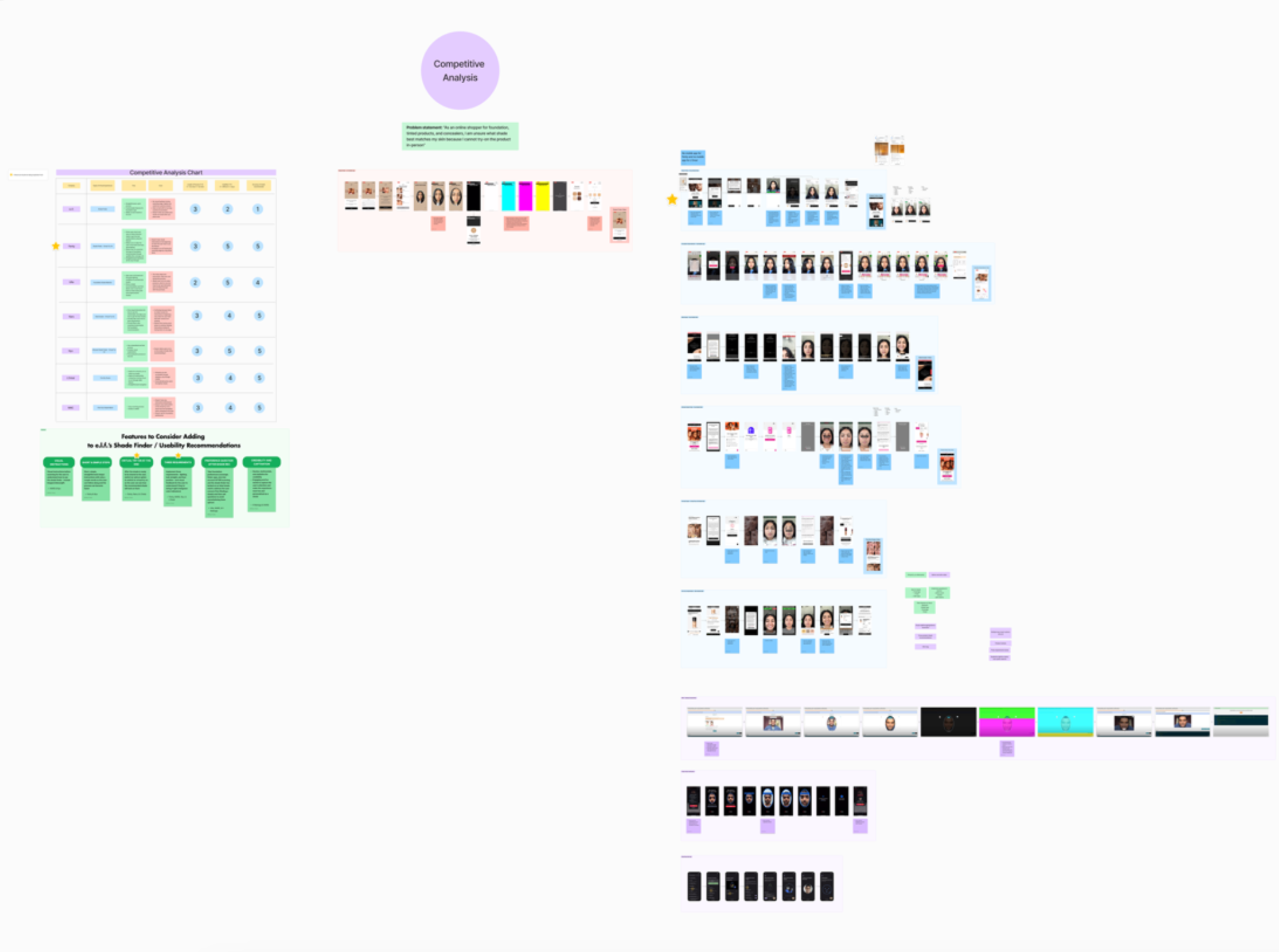
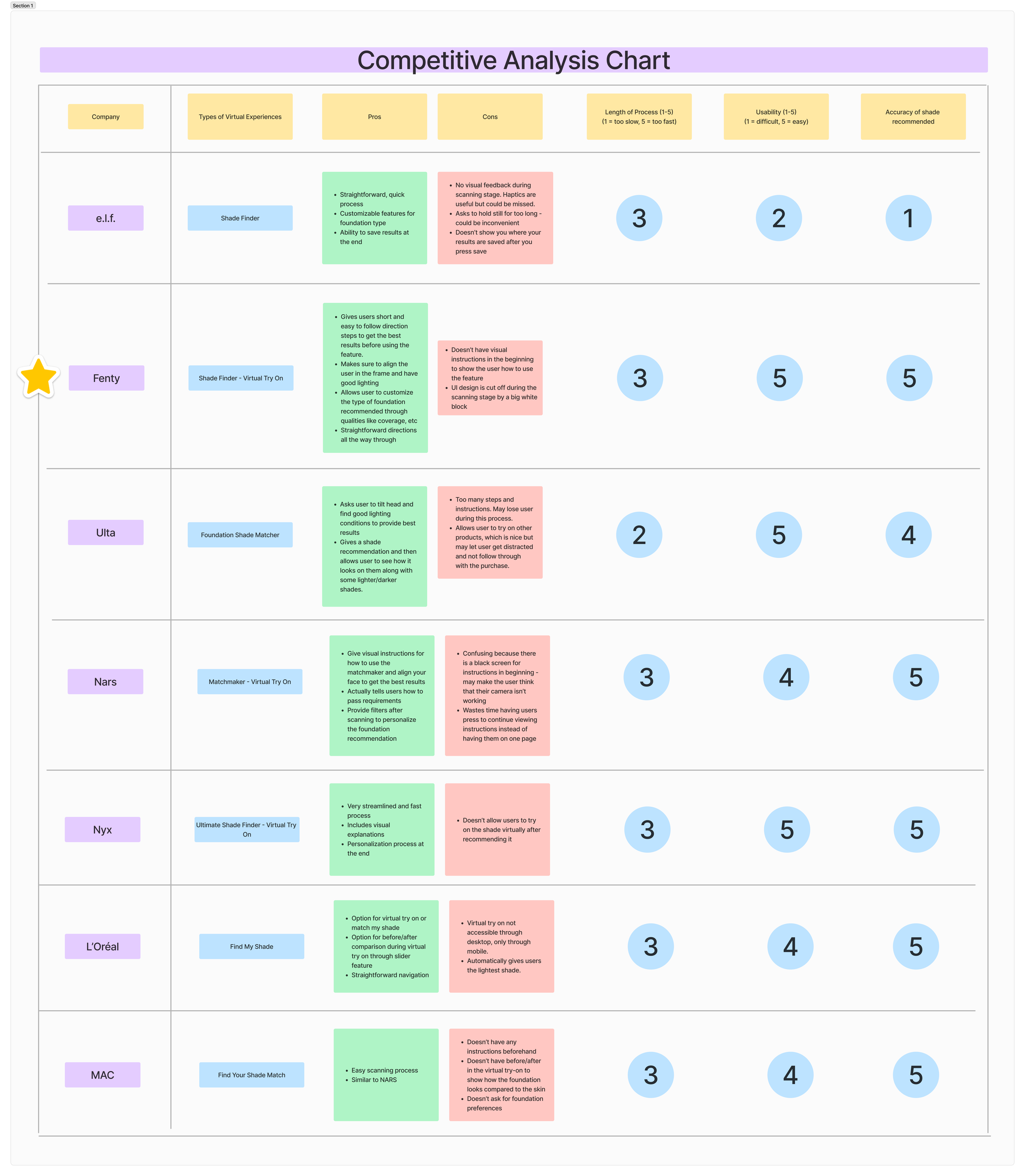
Fenty’s experience stood out for its ease and flow - clear instructions, fast scanning, and user-friendly visuals - making it our North Star.
Feature Recommendations
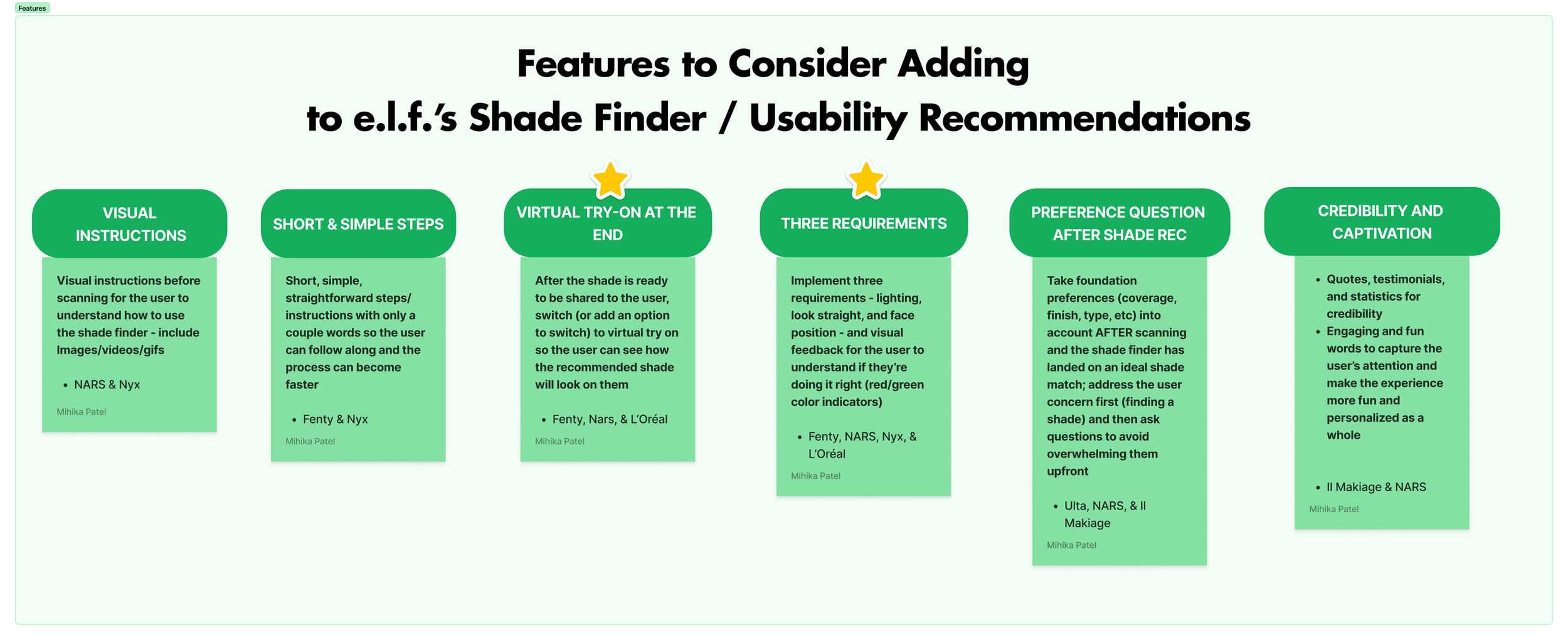
Based on competitor benchmarks and user pain points, I built a feature wish list that ultimately shaped the redesign - including clearer scanning guidance, a virtual try-on step, and stronger credibility signals around the AI itself.
Task Flows
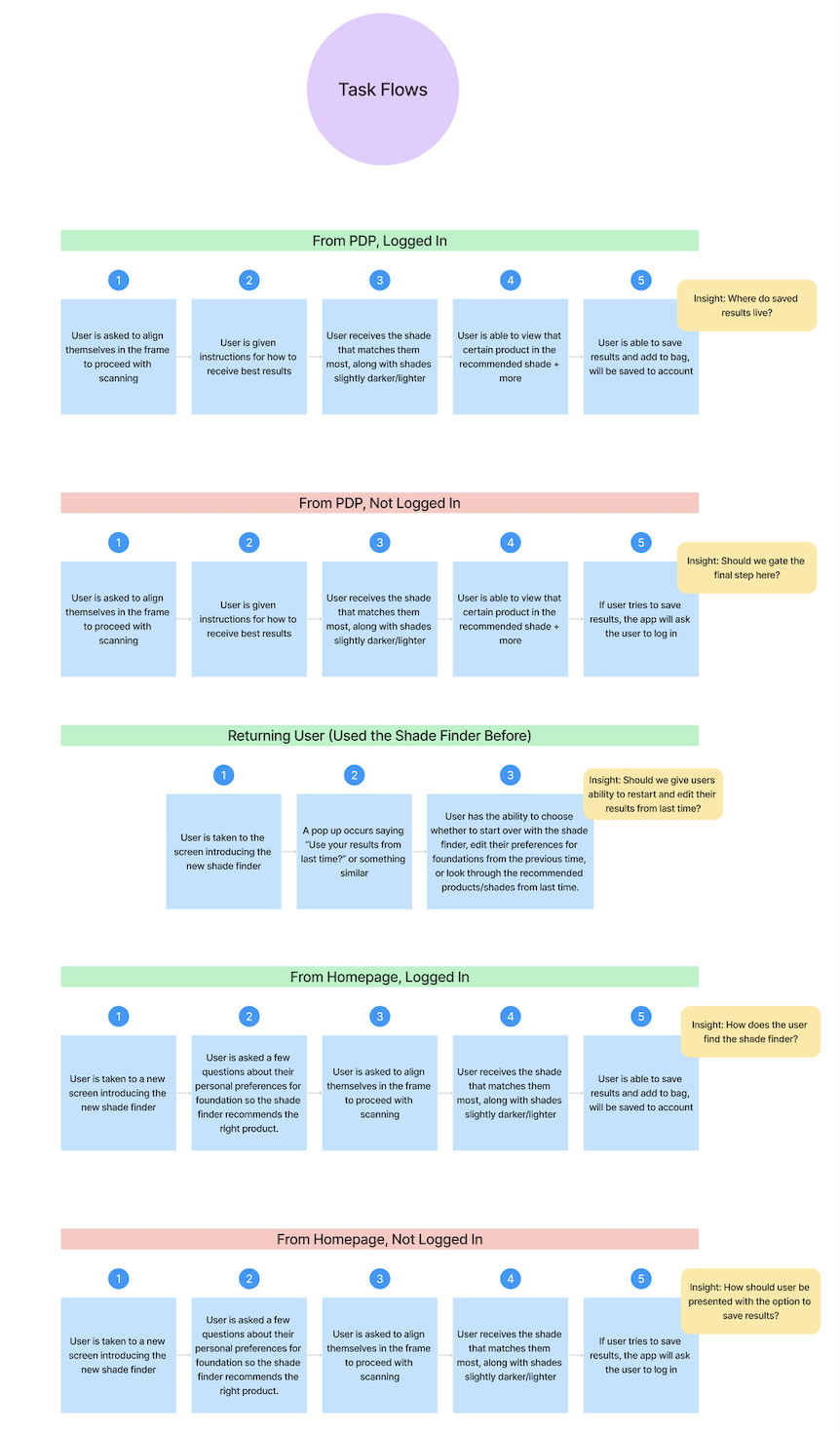
To serve different user types (logged-in vs. guest, first-time vs. returning), I mapped out multiple task flows.
These flows helped streamline the process and identify potential discrepancies between use cases. We ensured users would experience a consistent and accessible shade-matching journey, regardless of how they interacted with the tool.
DESIGN PROCESS
Mockups & Ideation
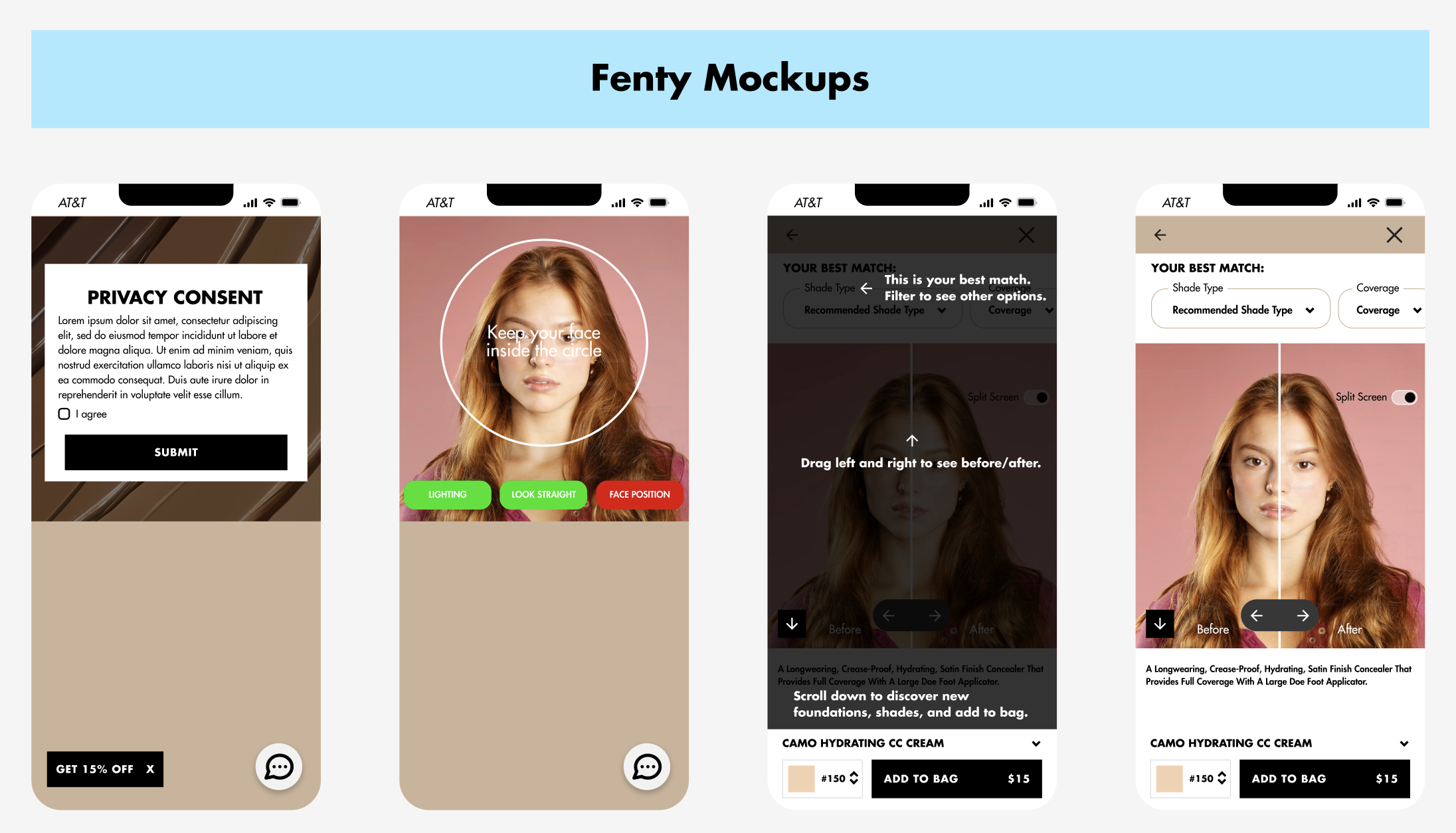
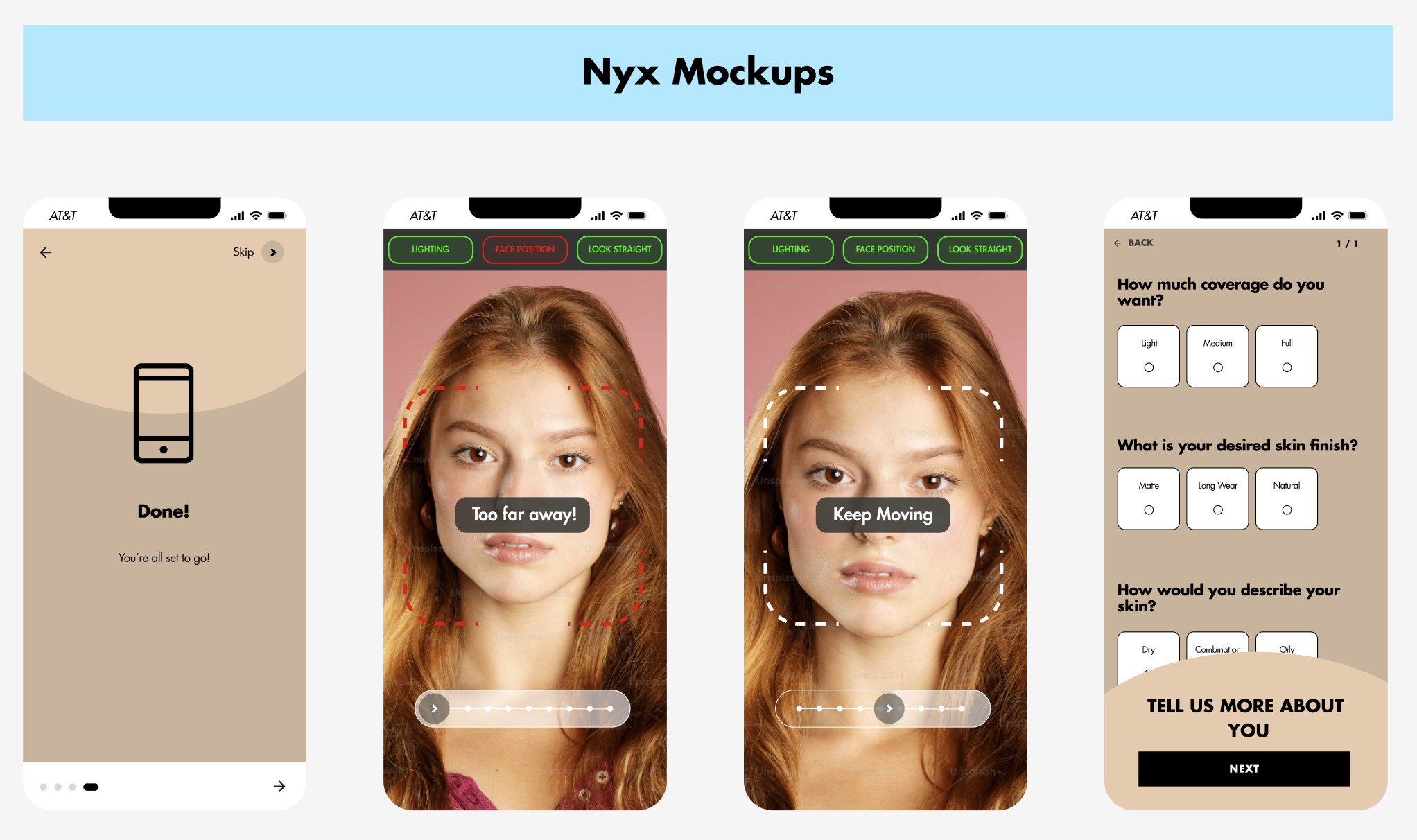
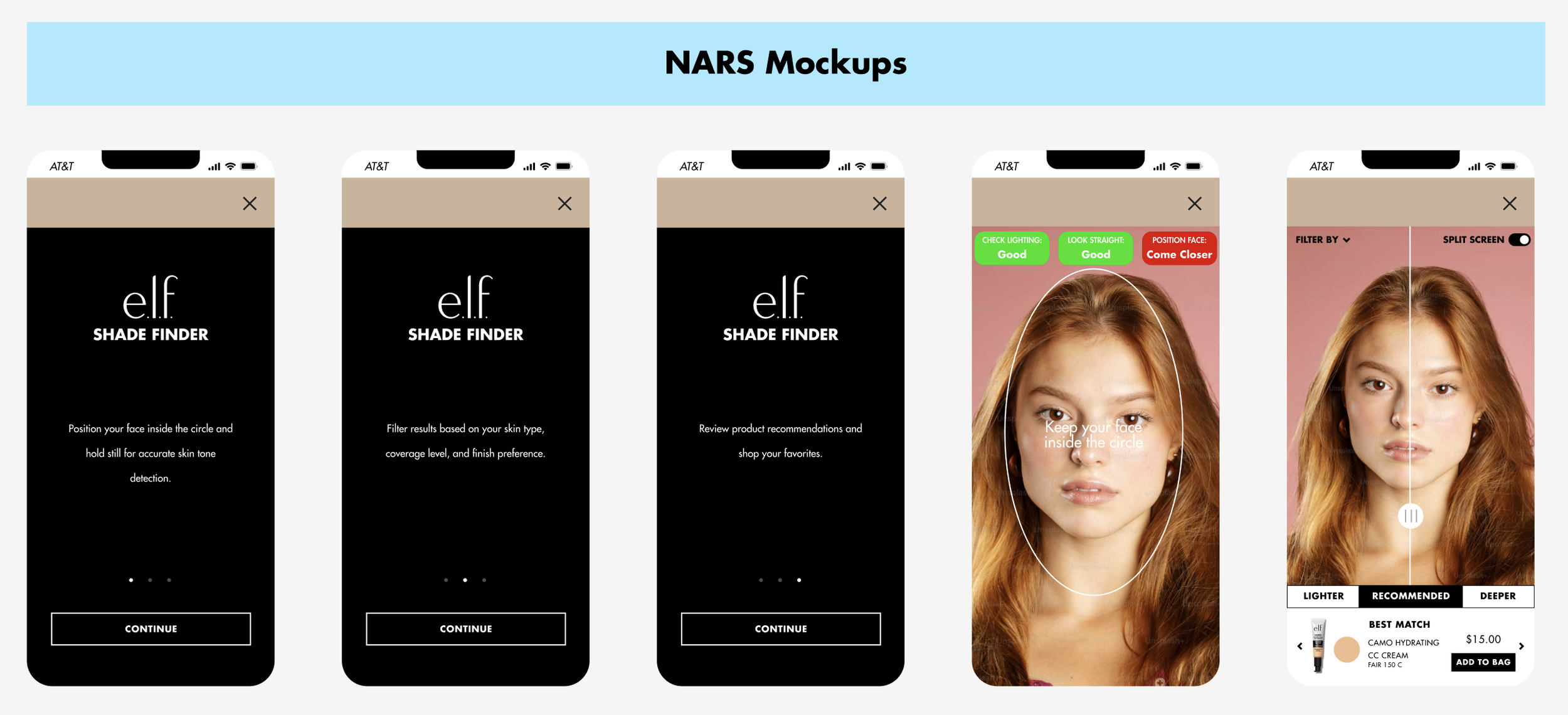
I built mockups of top-performing competitor flows using e.l.f. branding to understand the UI decisions driving their success, then explored multiple ways to signal scanning readiness to the user - including outlines, live visual feedback, and countdowns.
Full Flow Mapping
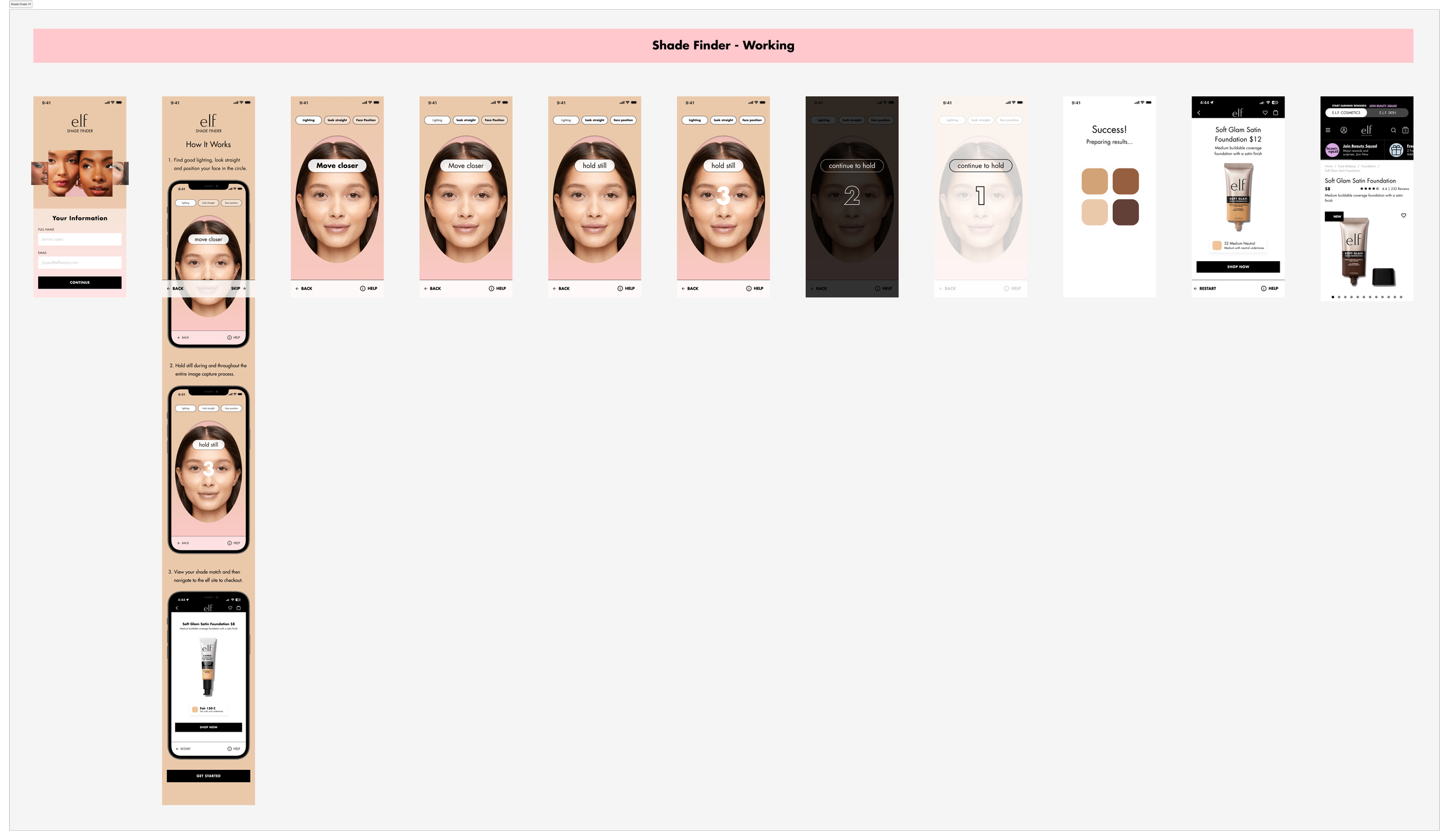
After several rounds of iteration and landing on a design, I plotted out the entire flow from login to the shade recommendation to get a feel of the product so far. Keeping brand consistency, I aligned typography, iconography, and spacing with e.l.f.’s evolving style guide.
A few strategic decisions included:
Short, directive instructions
Bold CTAs to improve conversion
Cross-sell opportunities post-shade match
Branding Review
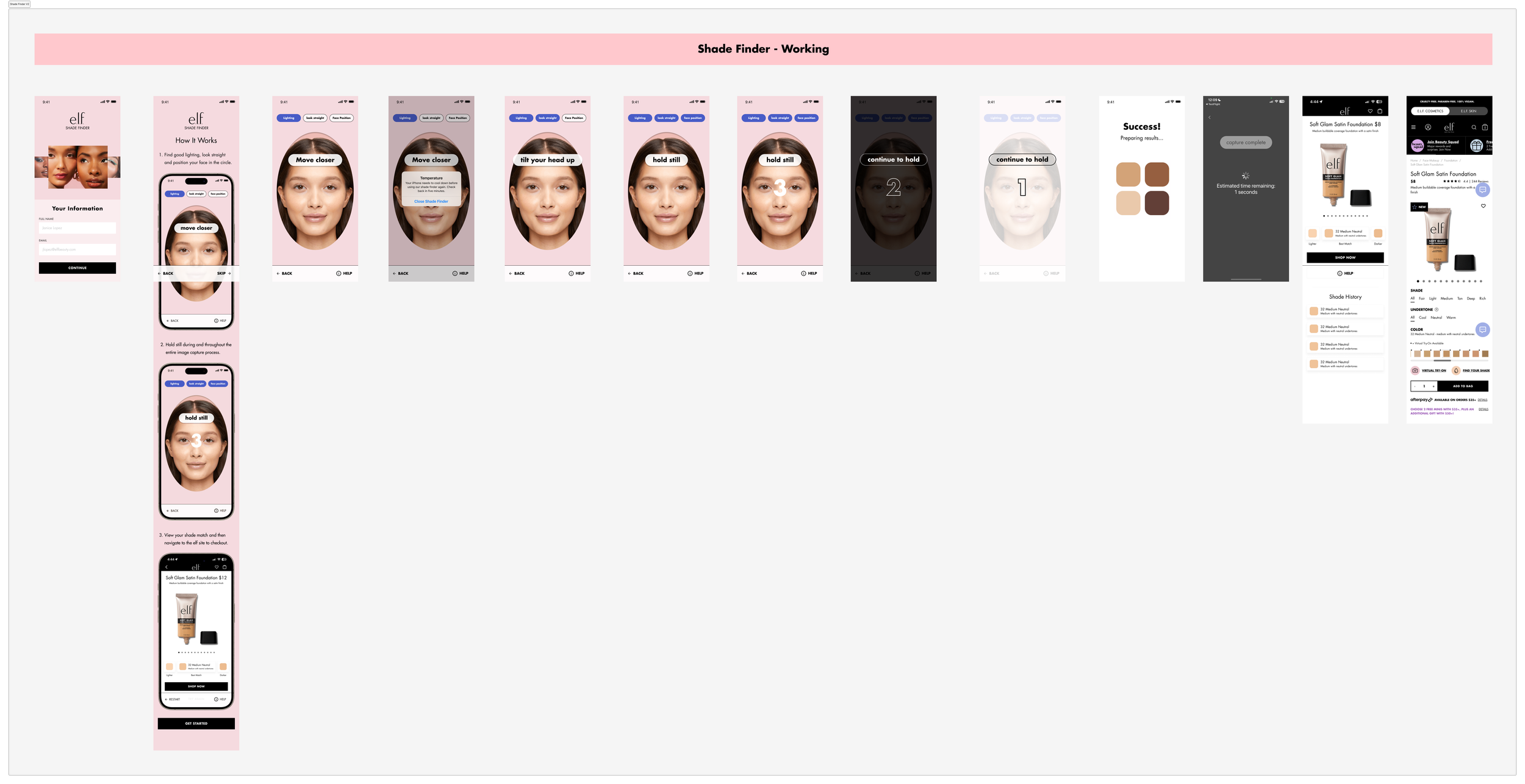
I led a deep dive into color and motion variations, opting for soft gradients and muted tones to keep the scanner UI non-distracting, while styling success states to celebrate the shade-match moment without overwhelming the interface.
USABILITY TESTING
Usability wasn't the problem - trusting the result was.
Setup
I designed a three-part usability test. The setup included:
1
Screener
Understanding the backgrounds of the users and their experience with online makeup shopping/products like shade finders.
2
Scenario
Situation for users to immerse themselves in before using our product: “Imagine you have found a new cosmetic product on the e.l.f. Mobile app, but you’re not sure which shade to purchase. You open the shadefinder to help you make a decision.”.
3
Survey
Gaging the users’ experience through post-task questions using multiple formats - rating scales, open responses, and qualitative feedback.
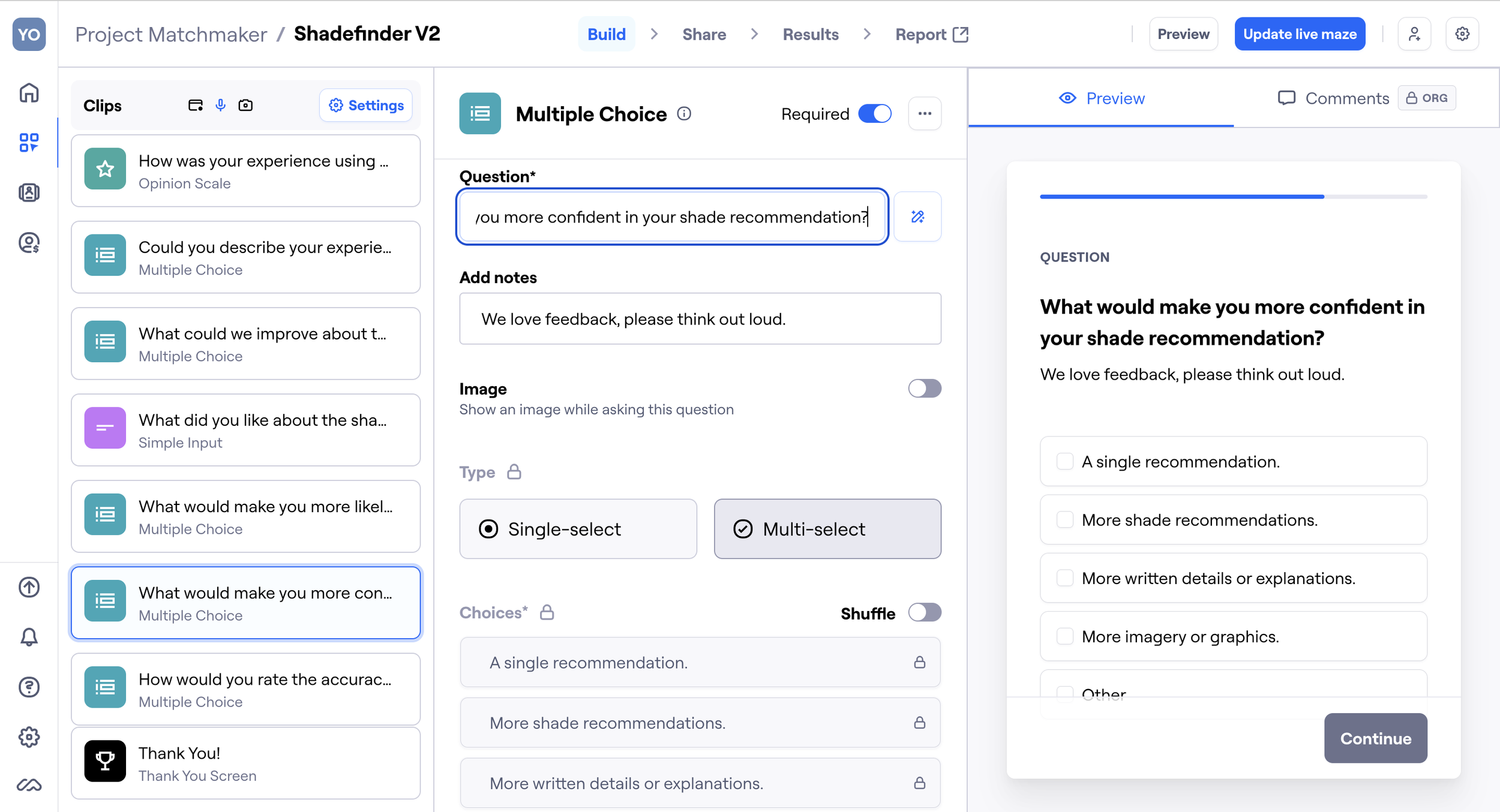
Feedback
Here's what users thought about our shade finder:
👍
88%
of users found the interface intuitive and appreciated being able to find their shade independently, without needing outside help.
👎
50%
of users were unsure about their match. Users wanted more visuals and explanations to boost confidence in the results.
"It was easy and straightforward to use, especially how my face should fit in the frame." ✅
USER A
"I wish there were more written details and explanations throughout the process." ❌
USER B
"More imagery and graphics would have been nice to have." ❌
USER D
"I like that it lets users find their shades without having to consult a professional make-up artist." ✅
USER C
"It was easy to use, and I also liked the format." ✅
USER E
FINAL TOUCHES
Design Decisions
With this testing data, I went back to the drawing board and made several adjustments.
1
Credibility Screen
Added a credibility screen explaining the AI technology behind the tool to enhance trust.
2
Instructions
Shortened the initial instructions and moved the more detailed ones to an easily accessible help button in the scanning stage.
3
UX Copy
Layered in fun, lighthearted, and empowering microcopy to humanize the flow
4
VTO & Confidence
Introduced a virtual try-on option and side-by-side comparisons with actual skin tones for more confidence in shade recommendations.
5
Cross Selling
Implemented an opportunity to increase user engagement with other products.
RESULTS
The redesign turned a frustration point into a 28% lift in conversion.
Through multiple rounds of design refinement, usability testing, and stakeholder feedback, the project boosted user engagement and trust in AI-driven recommendations, cut confusion, and streamlined the shade-finding journey end to end - strengthening the broader online shopping experience for complexion products.
Here's a screen recording from the launched version of our shade finder on the e.l.f. app!

TAKEAWAYS
Great UX doesn’t just look good - it earns trust.
By merging thoughtful interaction flows with AI technology and clean UI, I helped users feel confident shopping for complexion products online, even without in-person testing.
If I were to keep iterating, I would launch A/B tests for visual variations for the UI design, run live data testing to fine-tune shade accuracy by skin tone, and build out more complex personalization flows based on undertone, product preferences, and finish.